iPixel Creative is a Singapore web design and development Company. At iPixel Creative, we provides web design solution which helps your company stand out from the competitors. Our Solutions includes web design, website development, cms development, ecommerce solution and hosting solutions.
The more things change, the more they stay the same–or so it seems, at least in the graphics design trade. I know. That seems like a strange observation in a field where designers are replacing their pencils for styli. It is true that the world of graphics design is radically different on a superficial level. But once you scratch beneath the surface, you will find the real tools of the trade to be remarkably unchanged:
Sketchpads
Trade a pencil for a stylus, and you are still holding a long, narrow, likely cylindrical tool for drawing sketches on some type of pad. Whether on a paper pad or an iPad, it is still a pad that holds your graphical ideas. It hardly matters if the medium is graphite and trees, or glass and silicon.
What has changed are the number and types of threats about which a designer has to worry. Before, the biggest threat was that someone may try to steel your work. Now, the bad guys can use your work to steel information from other people.
Since 2002, we’ve known that common image files could be used as viruses and malware. Today, the methods are even more sophisticated. While many designers use a Mac, which is generally free of viruses, some types of threats can still get through. That is why antivirus software for Mac devices is becoming more and more important, as it protects users during online browsing sessions and even safeguards social media accounts.
You still could use help:
Blocking dangerous websites
Protecting your privacy on Google+, Facebook, Twitter, and LinkedIn
Ensuring safe surfing for the whole family
Macs and iDevices make great tools for designers, but still need to be used with security in mind. The most insecure component of any system is always the user.
Photoshop
Every designer knows about Photoshop, even if they don’t personally like it. Like Excel for office workers, almost every designer has to use it in some capacity, even if they do not use the advanced features. Photoshop is a staple of the design world.
This expensive and intimidating piece of software, among other things, lets artists alter images, even to the point of removing parts of an image from its setting for use in an different context. Love it or hate it, due to its ubiquity in the design world, you kind of have to have a passing familiarity with it.
But photoshopping (in the generic sense) is not new. It is as old a scissors. Ever sense we have been able to capture images, we have had the ability to manipulate them.
Since long before computers, when it came to pictures, seeing was not believing. Our tools may be more advanced. We can definitely create better illusions, and better cover our tracks after doing so. But enhancing images to make the bold and beautiful even bolder and more beautiful is as old as film. Maybe older.
A Designer’s Eye
At the end of the day, none of the high-tech tools and gadgets mean a thing if you do not have a designer’s eye. Style is hard to define. Good taste is even harder. Yet there are those who have the eye for it, and those who don’t. If you don’t, none of the photoshop running iPads will turn you into a great graphics designer.
Just consider the world of logos. Some, like the golden arches of McDonalds, are instant classics. A good designer recognizes it for the graphical goldmine that it is, and has always been. PayPal as a company, seems to be taking a more hit-or-miss approach to design.
iPads, Surfaces, and Cintiqs are all fine devices. Just remember, it is not the device being used that matters, but the designer that’s using it.
Android M, the next generation of Android has been announced (albeit no word on what M will be yet). Google recently showcased the Developer Preview of the latest version of its advanced mobile operating system in Google I/O 2015. This new release of Android tries to improve the fundamentals with big changes and plenty of bug-fixing.
After revamping the look and feel of Android Lollipop, this focus this round is to improve the core user experience of Android, and giving control back to the users. Note that this is just the developer preview and there may be other improvements coming when Android M is finally ready for the masses. In the meantime, here are some of the changes you can look forward to for Android 6.0.
1. App Info And Permissions
Android M makes every app "fess up" on the storage, battery life and data it is taking up, alongside the permissions it requires to work. And this is all provided in a more streamlined, structured and cleaner app info page, where you can also make further adjustments to the notifications it can display, app links (more on that later) as well as optimization preferences.
The permission model has also been changed. Whereas previously permissions were asked at the time the app was downloaded, now the apps will ask for permissions it require at runtime.
Aside from that you also have more control over app-specific mass-permissions, which is just a fancy phrase to say you can control permissions based on an app. For example, you can tap on Location and see a stream of apps that have access to your location.
From here you can choose to revoke permission from apps you don’t think should have access to your location, while keeping other permissions intact.
2. Doze
Android M brings a new feature to improve your device’s battery life – Doze. A battery management feature, Doze is the name for the deep-sleep state of Android M – this state uses just half of the power in sleep state, which means that your device’s battery lasts double the time.
Android M’s Doze feature is auto-activated once the device is left unattended for a while. This feature uses motion detection. If it is not attended to for a significant amount of time, or is stationary with the screen off or unplugged, Doze kicks in.
Doze’s deep-sleep mode allows the device to only periodically resume normal operations and for brief time periods. App syncing and pending operations will still run, and if the app receives a high-priority Google Cloud Messaging message, Doze allows brief network access.
3. Android Pay
Android Pay is the Google’s answer to Apple Pay. Like Google Wallet, Android Pay is a NFC payment feature, which allows anyone with a NFC-enabled Android device to pay at any NFC terminal available at partner stores. But unlike Google Wallet, Android Pay comes pre-installed in the device.
Android Pay, as per Google claims, is better and more secure because it only uses a virtual card number during the transaction and not your actual debit/credit card number. Moreover, starting from Android M, users can even authorize their Android Pay transactions using their fingerprint, thus easing the whole process.
There are 700 NFC-enabled partner stores in the US and thousands of Android Pay supported apps already available.
4. Google Now on Tap
Google Now is Android’s virtual assistant which shows you weather updates, travel reminders, news and content based on your interests and enhances your overall search experience. “Now on Tap” is an attempt to enhance that experience by bringing in real-time context to searches and content.
What does that mean? It means no more breaking away from what you are doing, fumbling between one app or another to look up information. Google Now on Tap lets you use the Home button to get the info delivered to you.
If in the middle of your Whatsapp session, or in an email, your friends mention going for a movie and you want more info about that movie, just long-press the Home button and Google will bring you titbits of information, the kind you would probably look up anyways.
Now on Tap not lets you make a more relevant and meaningful (plus automated) Google search anytime, anywhere, while diminishing the need for making dual screens work as well as making Search a way of life.
5. Fingerprint
Fingerprint finally comes to the Android ecosystem and since Google is the one bringing this to the platform, that means any phone running Android M will be able to adopt this security feature. Android M will have native fingerprint support: fingerprint scanning can be applied using a standard and open set of APIs that works consistently across a range of devices and sensors.
This fingerprint native support will allow developers to build unified apps with fingerprint security for authorization and payments. It will also allow users to unlock devices and make purchases on Google Play. Moreover, it will also work with Android Pay to enable Android users to readily and securely use their Android device to pay in brick-and-mortar stores or to authorize payments with Android Pay partner apps.
6. Two-Way Charging
Two-way charging is a term coined for the wonderful world of device charging – your Android phone will be able to charge another mobile phone or tablet, like a portable battery can. However, there is a catch.
Android M will support the USB Type C charger or USB-C, which means that this two-way charging won’t be possible if the other phone does not have a USB-C connector. This reversible-type connector allows a faster rate of charging, almost 3 to 5 times faster, which is the kind of innovation we look for in our smartphones.
This change may spur device manufacturers to build more phones and tablets that adopt the USB-C connector as well.
7. App Links
If you have always been irritated by your device constantly asking you which app you would like to open a certain link with, Android M takes that out of the picture. The way links are served previously under the Android Intent system is that users get a list of apps they want to launch a link with: an app, another app, your favorite browser, a second favorite etc.
With Android M, developers can now add an auto-verified attribute which will allow the chosen link to be opened in a particular app. The developers will choose on your behalf. What you get is a smoother, quicker opening of links, with no interruptions.
8. Improvements
Android M is not just about big changes, but also includes lots of minor improvements and "thousands" of bug fixes to cater to the voices of Android users. Here are a few major ones.
1. Lock screen message lets anyone show a customized message on the lock screen. Previously, the option asked for the user’s name to be displayed on the lock screen.
2. Volume controls now come with a dropdown that lets you control the ringtone, media and alarm volumes directly from the hovered control bar.
3. Do not disturb is the name given to the auto-silent feature that allows users to set rules or restrict notifications by specific days or time. Users can also manually switch it on or off using Quick Toggles or from the Settings.
4. App Notifications gives users more control over what and where notifications can be shown, including what you see in the heads-up notifications.
5. System UI Tuner (Developer options) lets users manage and arrange the quick toogles and even supports adding new toggles.
6. USB Configuration (Developer options) lets users set the default configuration for USB attached to the device. Options include:
MTP (Media Transfer Protocol)
PTP (Picture TP)
RNDIS (USB Ethernet)
Audio Source
MIDI
7. External storage can be adopted with Android M. This means extra storage from, say, SD cards will be encrypted and formatted to behave like internal storage, allowing for the moving of apps and private data easily between storage devices.
You can find more behavior changes in this Android M Developer Preview.
What do you think? Which feature makes you interested in Android M? Let us know your thoughts using the comments section below.
Android M, the next generation of Android has been announced (albeit no word on what M will be yet). Google recently showcased the Developer Preview of the latest version of its advanced mobile operating system in Google I/O 2015. This new release of Android tries to improve the fundamentals with big changes and plenty of bug-fixing.
After revamping the look and feel of Android Lollipop, this focus this round is to improve the core user experience of Android, and giving control back to the users. Note that this is just the developer preview and there may be other improvements coming when Android M is finally ready for the masses. In the meantime, here are some of the changes you can look forward to for Android 6.0.
1. App Info And Permissions
Android M makes every app "fess up" on the storage, battery life and data it is taking up, alongside the permissions it requires to work. And this is all provided in a more streamlined, structured and cleaner app info page, where you can also make further adjustments to the notifications it can display, app links (more on that later) as well as optimization preferences.
The permission model has also been changed. Whereas previously permissions were asked at the time the app was downloaded, now the apps will ask for permissions it require at runtime.
Aside from that you also have more control over app-specific mass-permissions, which is just a fancy phrase to say you can control permissions based on an app. For example, you can tap on Location and see a stream of apps that have access to your location.
From here you can choose to revoke permission from apps you don’t think should have access to your location, while keeping other permissions intact.
2. Doze
Android M brings a new feature to improve your device’s battery life – Doze. A battery management feature, Doze is the name for the deep-sleep state of Android M – this state uses just half of the power in sleep state, which means that your device’s battery lasts double the time.
Android M’s Doze feature is auto-activated once the device is left unattended for a while. This feature uses motion detection. If it is not attended to for a significant amount of time, or is stationary with the screen off or unplugged, Doze kicks in.
Doze’s deep-sleep mode allows the device to only periodically resume normal operations and for brief time periods. App syncing and pending operations will still run, and if the app receives a high-priority Google Cloud Messaging message, Doze allows brief network access.
3. Android Pay
Android Pay is the Google’s answer to Apple Pay. Like Google Wallet, Android Pay is a NFC payment feature, which allows anyone with a NFC-enabled Android device to pay at any NFC terminal available at partner stores. But unlike Google Wallet, Android Pay comes pre-installed in the device.
Android Pay, as per Google claims, is better and more secure because it only uses a virtual card number during the transaction and not your actual debit/credit card number. Moreover, starting from Android M, users can even authorize their Android Pay transactions using their fingerprint, thus easing the whole process.
There are 700 NFC-enabled partner stores in the US and thousands of Android Pay supported apps already available.
4. Google Now on Tap
Google Now is Android’s virtual assistant which shows you weather updates, travel reminders, news and content based on your interests and enhances your overall search experience. “Now on Tap” is an attempt to enhance that experience by bringing in real-time context to searches and content.
What does that mean? It means no more breaking away from what you are doing, fumbling between one app or another to look up information. Google Now on Tap lets you use the Home button to get the info delivered to you.
If in the middle of your Whatsapp session, or in an email, your friends mention going for a movie and you want more info about that movie, just long-press the Home button and Google will bring you titbits of information, the kind you would probably look up anyways.
Now on Tap not lets you make a more relevant and meaningful (plus automated) Google search anytime, anywhere, while diminishing the need for making dual screens work as well as making Search a way of life.
5. Fingerprint
Fingerprint finally comes to the Android ecosystem and since Google is the one bringing this to the platform, that means any phone running Android M will be able to adopt this security feature. Android M will have native fingerprint support: fingerprint scanning can be applied using a standard and open set of APIs that works consistently across a range of devices and sensors.
This fingerprint native support will allow developers to build unified apps with fingerprint security for authorization and payments. It will also allow users to unlock devices and make purchases on Google Play. Moreover, it will also work with Android Pay to enable Android users to readily and securely use their Android device to pay in brick-and-mortar stores or to authorize payments with Android Pay partner apps.
6. Two-Way Charging
Two-way charging is a term coined for the wonderful world of device charging – your Android phone will be able to charge another mobile phone or tablet, like a portable battery can. However, there is a catch.
Android M will support the USB Type C charger or USB-C, which means that this two-way charging won’t be possible if the other phone does not have a USB-C connector. This reversible-type connector allows a faster rate of charging, almost 3 to 5 times faster, which is the kind of innovation we look for in our smartphones.
This change may spur device manufacturers to build more phones and tablets that adopt the USB-C connector as well.
7. App Links
If you have always been irritated by your device constantly asking you which app you would like to open a certain link with, Android M takes that out of the picture. The way links are served previously under the Android Intent system is that users get a list of apps they want to launch a link with: an app, another app, your favorite browser, a second favorite etc.
With Android M, developers can now add an auto-verified attribute which will allow the chosen link to be opened in a particular app. The developers will choose on your behalf. What you get is a smoother, quicker opening of links, with no interruptions.
8. Improvements
Android M is not just about big changes, but also includes lots of minor improvements and "thousands" of bug fixes to cater to the voices of Android users. Here are a few major ones.
1. Lock screen message lets anyone show a customized message on the lock screen. Previously, the option asked for the user’s name to be displayed on the lock screen.
2. Volume controls now come with a dropdown that lets you control the ringtone, media and alarm volumes directly from the hovered control bar.
3. Do not disturb is the name given to the auto-silent feature that allows users to set rules or restrict notifications by specific days or time. Users can also manually switch it on or off using Quick Toggles or from the Settings.
4. App Notifications gives users more control over what and where notifications can be shown, including what you see in the heads-up notifications.
5. System UI Tuner (Developer options) lets users manage and arrange the quick toogles and even supports adding new toggles.
6. USB Configuration (Developer options) lets users set the default configuration for USB attached to the device. Options include:
MTP (Media Transfer Protocol)
PTP (Picture TP)
RNDIS (USB Ethernet)
Audio Source
MIDI
7. External storage can be adopted with Android M. This means extra storage from, say, SD cards will be encrypted and formatted to behave like internal storage, allowing for the moving of apps and private data easily between storage devices.
You can find more behavior changes in this Android M Developer Preview.
What do you think? Which feature makes you interested in Android M? Let us know your thoughts using the comments section below.
Android M, the next generation of Android has been announced (albeit no word on what M will be yet). Google recently showcased the Developer Preview of the latest version of its advanced mobile operating system in Google I/O 2015. This new release of Android tries to improve the fundamentals with big changes and plenty of bug-fixing.
After revamping the look and feel of Android Lollipop, this focus this round is to improve the core user experience of Android, and giving control back to the users. Note that this is just the developer preview and there may be other improvements coming when Android M is finally ready for the masses. In the meantime, here are some of the changes you can look forward to for Android 6.0.
1. App Info And Permissions
Android M makes every app "fess up" on the storage, battery life and data it is taking up, alongside the permissions it requires to work. And this is all provided in a more streamlined, structured and cleaner app info page, where you can also make further adjustments to the notifications it can display, app links (more on that later) as well as optimization preferences.
The permission model has also been changed. Whereas previously permissions were asked at the time the app was downloaded, now the apps will ask for permissions it require at runtime.
Aside from that you also have more control over app-specific mass-permissions, which is just a fancy phrase to say you can control permissions based on an app. For example, you can tap on Location and see a stream of apps that have access to your location.
From here you can choose to revoke permission from apps you don’t think should have access to your location, while keeping other permissions intact.
2. Doze
Android M brings a new feature to improve your device’s battery life – Doze. A battery management feature, Doze is the name for the deep-sleep state of Android M – this state uses just half of the power in sleep state, which means that your device’s battery lasts double the time.
Android M’s Doze feature is auto-activated once the device is left unattended for a while. This feature uses motion detection. If it is not attended to for a significant amount of time, or is stationary with the screen off or unplugged, Doze kicks in.
Doze’s deep-sleep mode allows the device to only periodically resume normal operations and for brief time periods. App syncing and pending operations will still run, and if the app receives a high-priority Google Cloud Messaging message, Doze allows brief network access.
3. Android Pay
Android Pay is the Google’s answer to Apple Pay. Like Google Wallet, Android Pay is a NFC payment feature, which allows anyone with a NFC-enabled Android device to pay at any NFC terminal available at partner stores. But unlike Google Wallet, Android Pay comes pre-installed in the device.
Android Pay, as per Google claims, is better and more secure because it only uses a virtual card number during the transaction and not your actual debit/credit card number. Moreover, starting from Android M, users can even authorize their Android Pay transactions using their fingerprint, thus easing the whole process.
There are 700 NFC-enabled partner stores in the US and thousands of Android Pay supported apps already available.
4. Google Now on Tap
Google Now is Android’s virtual assistant which shows you weather updates, travel reminders, news and content based on your interests and enhances your overall search experience. “Now on Tap” is an attempt to enhance that experience by bringing in real-time context to searches and content.
What does that mean? It means no more breaking away from what you are doing, fumbling between one app or another to look up information. Google Now on Tap lets you use the Home button to get the info delivered to you.
If in the middle of your Whatsapp session, or in an email, your friends mention going for a movie and you want more info about that movie, just long-press the Home button and Google will bring you titbits of information, the kind you would probably look up anyways.
Now on Tap not lets you make a more relevant and meaningful (plus automated) Google search anytime, anywhere, while diminishing the need for making dual screens work as well as making Search a way of life.
5. Fingerprint
Fingerprint finally comes to the Android ecosystem and since Google is the one bringing this to the platform, that means any phone running Android M will be able to adopt this security feature. Android M will have native fingerprint support: fingerprint scanning can be applied using a standard and open set of APIs that works consistently across a range of devices and sensors.
This fingerprint native support will allow developers to build unified apps with fingerprint security for authorization and payments. It will also allow users to unlock devices and make purchases on Google Play. Moreover, it will also work with Android Pay to enable Android users to readily and securely use their Android device to pay in brick-and-mortar stores or to authorize payments with Android Pay partner apps.
6. Two-Way Charging
Two-way charging is a term coined for the wonderful world of device charging – your Android phone will be able to charge another mobile phone or tablet, like a portable battery can. However, there is a catch.
Android M will support the USB Type C charger or USB-C, which means that this two-way charging won’t be possible if the other phone does not have a USB-C connector. This reversible-type connector allows a faster rate of charging, almost 3 to 5 times faster, which is the kind of innovation we look for in our smartphones.
This change may spur device manufacturers to build more phones and tablets that adopt the USB-C connector as well.
7. App Links
If you have always been irritated by your device constantly asking you which app you would like to open a certain link with, Android M takes that out of the picture. The way links are served previously under the Android Intent system is that users get a list of apps they want to launch a link with: an app, another app, your favorite browser, a second favorite etc.
With Android M, developers can now add an auto-verified attribute which will allow the chosen link to be opened in a particular app. The developers will choose on your behalf. What you get is a smoother, quicker opening of links, with no interruptions.
8. Improvements
Android M is not just about big changes, but also includes lots of minor improvements and "thousands" of bug fixes to cater to the voices of Android users. Here are a few major ones.
1. Lock screen message lets anyone show a customized message on the lock screen. Previously, the option asked for the user’s name to be displayed on the lock screen.
2. Volume controls now come with a dropdown that lets you control the ringtone, media and alarm volumes directly from the hovered control bar.
3. Do not disturb is the name given to the auto-silent feature that allows users to set rules or restrict notifications by specific days or time. Users can also manually switch it on or off using Quick Toggles or from the Settings.
4. App Notifications gives users more control over what and where notifications can be shown, including what you see in the heads-up notifications.
5. System UI Tuner (Developer options) lets users manage and arrange the quick toogles and even supports adding new toggles.
6. USB Configuration (Developer options) lets users set the default configuration for USB attached to the device. Options include:
MTP (Media Transfer Protocol)
PTP (Picture TP)
RNDIS (USB Ethernet)
Audio Source
MIDI
7. External storage can be adopted with Android M. This means extra storage from, say, SD cards will be encrypted and formatted to behave like internal storage, allowing for the moving of apps and private data easily between storage devices.
You can find more behavior changes in this Android M Developer Preview.
What do you think? Which feature makes you interested in Android M? Let us know your thoughts using the comments section below.
Fact: There are over 1.2 gazillion fonts in the world. Well, maybe that’s not an exact figure (or a real one at that), but if you’ve recently looked online in a hunt after the perfect serif, sans, display, or dingbat, you’ll have noticed that there are countless options.
The perfect typeface can make the difference between a good design and a great one (though I can’t say that it will bring a mediocre piece to greatness). The wrong typeface, however, can make an otherwise great design suffer.
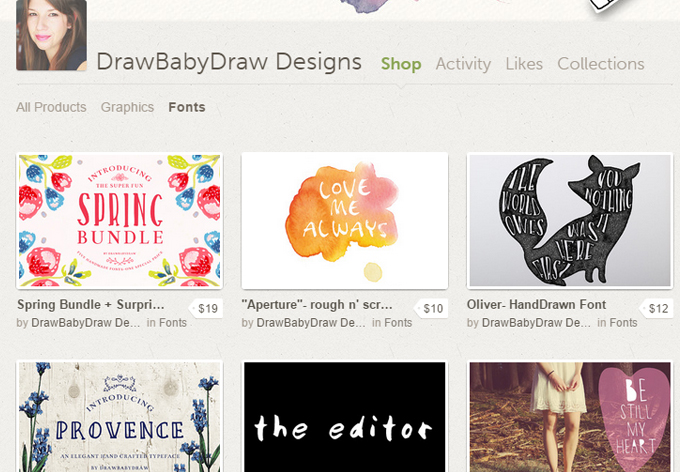
I’ll spare you the smug jokes about Comic Sans and Papyrus, but in today’s fast-paced design world, using notoriously over-used typefaces is a thing of the past. With easily accessible font-creation software, and online seller markets like Creative Market, practically anyone can design and create their own fonts. Today, I’d like to share with you my own experience, and some of the things I’ve learned over the last year.
1. Try it, You Might Like It
When I opened my Creative Market shop a little over a year ago, my intention was to create and share things that I love, and that would be useful to other designers. I was drawn to creating clip art and patterns, and had never thought about the seemingly daunting task of creating a font! It wasn’t long before I was overcome with inspiration and itching to try my hand at typeface design.
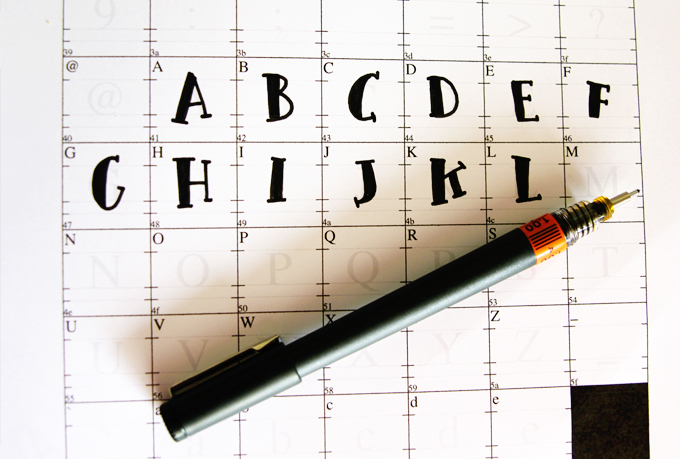
A quick Google search led me Paintfont.com, an admittedly amateurish program made to let anyone draw and scan their characters, upload their printable, and install their own font in minutes!
PaintFont’s printable template
Let me be the first to tell you: it’s far from perfect. Once scanned, the program will slightly smooth and simplify your scanned characters, and you don’t get any say in the kerning, and as for any tweaks you want to make, you’ll need to start over… it’s basically hit or miss.
I made these slight imperfections work for me, by creating purposely awkward, hand-drawn fonts, and have been really pleased with the positive feedback that came my way.
If it sounds unappealing, perhaps you’ll reconsider when I tell you that professional font creation software (called font editors) can cost hundreds of dollars, and PaintFont is free. I would definitely recommend trying it out, just to test out if type design is for you.
2. Find your Style
It can be intimidating to try and dip your toe in what is a super-saturated market. But remember, you’re the best person at being you, so instead of trying to mimic what’s already out there, find your voice as a designer and share it with the rest of us!
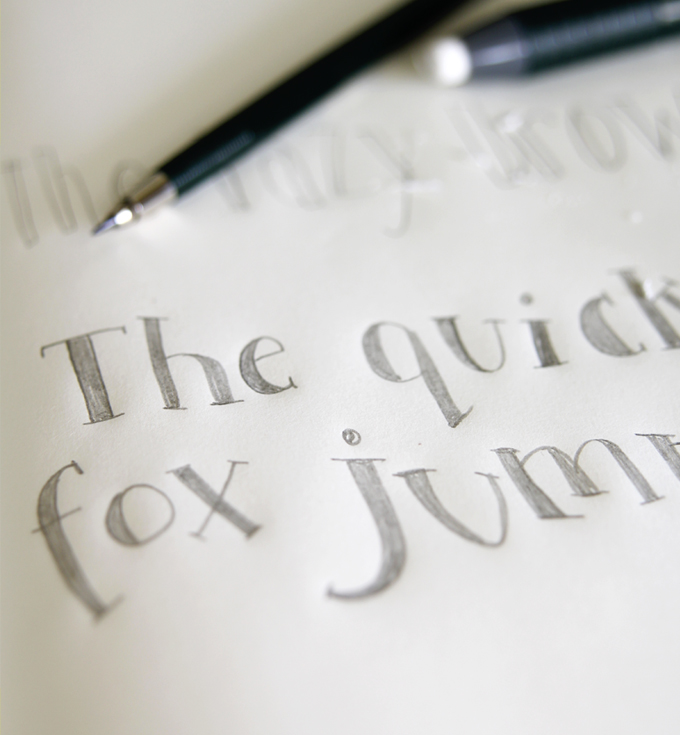
Your sketchbook is the perfect place to start brainstorming ideas for a new typeface
A good place to start is creating your own handwriting into a font (as long as it’s legible) people love unique hand-drawn styles.
3. Be Willing to Spend the Big Bucks
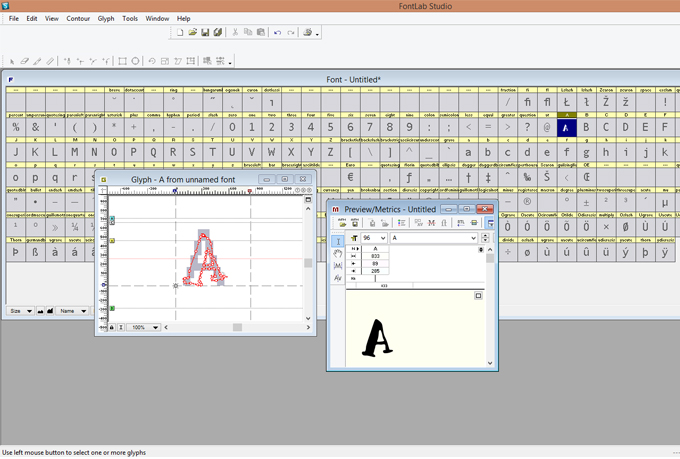
I recently splurged on Fontlab Studio, one of the more well-known font editors. By splurged I mean I cried as I typed in my credit card number. (Just kidding. I only cried when I actually opened FontLab for the first time, more on that in a moment.)
But I considered it an investment: as I make better fonts, I can feel comfortable charging more for them, and eventually it will pay off.
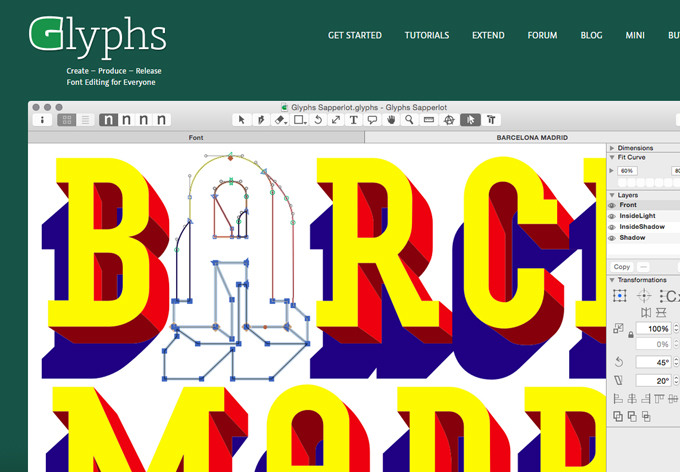
Another popular font editor is Glyphs Mini, but there are many more options out there, so do some research to find which editor is right for you.
Glyphs is just one of many font editors out there
4. There’s A Steep Learning Curve
As I mentioned, I was taken aback by all the menu options in the program. I thought that knowing what ‘kerning’ and ‘leading’ meant was enough. Boy was I wrong!
Luckily, you don’t have to utilize all (or even most) of the options, but you will have to take the time to learn quite a few of the basics.
FontLab Studio
You’ll find plenty of resources to help you learn the ropes, and many forums and friendly advice from fellow type designers are available on the Internet.
5. Have Fun and Always Grow
Creating a font is a labor of love. From finding a way to make all your characters work cohesively, to slowly but surely fine tuning them in illustrator, and finally painstakingly perfecting the kerning, seeing a typeface through from idea to fruition can take weeks and months.
Is that a long time? In my opinion, yes. Is it awesome to see some of your fonts adorning some amazing designs and products out in the world, and to know that you’re a part of it? Big yes.
I’d love to know, have you given typeface design a try? Did you like it? What tips would you share with someone who’s eager to give it a go?
Shelly Laslo is a graphic designer and illustrator. She is the owner of DrawBabyDraw Designs, where she sells handmade design resources which give your work a unique, one-a-kind charm. You can also check out her work on Instagram.