iPixel Creative is a Singapore web design and development Company. At iPixel Creative, we provides web design solution which helps your company stand out from the competitors. Our Solutions includes web design, website development, cms development, ecommerce solution and hosting solutions.
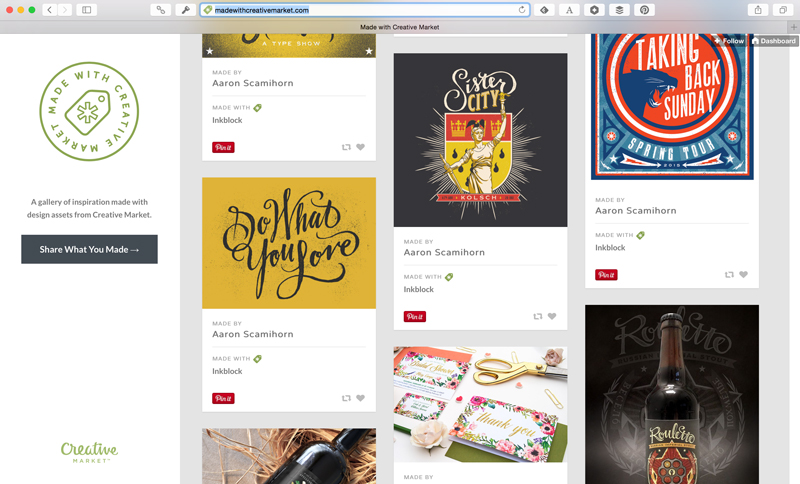
We believe that Creative Market is the best place to find useful and beautiful resources for your design work. Over the years, we’ve seen this proved time and time again as extremely talented designers share with us the amazing things they make with Creative Market assets. Today, we’re kicking off a special project to show off the creations of our community. It’s called Made With Creative Market, and we think you’re going to love it.
What Is It?
It’s all in the name. Made With Creative Market is a simple, beautiful gallery of design work that was created using anything from Creative Market. From fonts to icons and even Lightroom actions, Made With Creative Market will display the potential of using assets from our talented shop owners to boost the aesthetic appeal of whatever you’re working on. We’re hoping it inspires you to put your own unique spin on everything you buy at Creative Market.
You Can Contribute!
Made With Creative Market is a project that’s truly for and by our awesome community. You’ll already find some great design work displayed, but it’s 100% up to you to fill this gallery up.
We want everyone who uses Creative Market to create something that they’re proud of to submit it (that goes for buyers and shop owners!). Submissions are completely free and only take a second. It’s time to dig into your project archives and start submitting!
Note that existing Creative Market product screenshots will not be accepted. We want Made With Creative Market to be a fresh source of inspiration that is distinct from our normal stream of products. You are welcome to create new, unique designs to show off your products in action though!
Do you remember those action heroes from the 80’s and early 90s? Names such as Chuck Norris, Steven Seagal, Sylvester Stallone, Jean-Claude Van Damme and, of course, Arnold Schwarzenegger? Well, talented Italian designers Davide Mazzuchin & Matteo Goi have created a gallery of illustrated GIFs, entitled Past Action Heroes, as a tribute to those classic heroes from their younger years. Here are some of our favorites.
A photography website is not just a regular website – it is a collection of someone ‘s talent and capabilities. There are plenty of websites that can properly display a photographer ‘s work but WordPress is an option that gives you ample room for customization. This means that you want to ensure that you have the right plugins to make the browsing experience as efficient and smooth as possible.
There are many WordPress photo gallery plugins available on the web that help you with just that. Here, we have gathered 10 of the best photo gallery plugins that can help you make your WordPress site even more alluring. From editing images to including audio, there are various functions you can find. If you think we’ve missed out on any that should be included, do let us know in the comments.
NextGEN Gallery is one of the most popular WordPress gallery plugins around. It allows batch uploading and management of image galleries, slideshow and thumbnail style galleries, editing of thumbnails. It also allows one to turn group galleries into albums and various other features that can really give a striking look to one ‘s website. [Get it here – Free and Premium]
2. Easy Media Gallery
Easy Media Gallery is a plugin which provides an easy way to display grid galleries, photo albums, galleries with pagination and Google Maps and Google Street View as well. You can also embed videos from YouTube, Vimeo and other video sites. This allows for more interactivity on your site and gives a better experience too. [Get it here – Free and Premium]
3. Photo Gallery
Photo Gallery is a responsive WordPress plugin equipped with different tools and options for adding image galleries as well as editing images. It offers the management of unlimited photos, support for many image formats. It also has support for adding YouTube and Vimeo Videos within galleries and comes with audio playback for image slide shows. [Get it here – Free and Premium]
4. Responsive Photo Gallery
Responsive Photo Gallery is based on the Bootstrap framework and allows tiy to add unlimited images on WordPress website. It also provides light box preview using a fading animation effect. The shortcode [WRG] can be used to publish photo galleries into any page of your WordPress site. Other important features are simple and easy admin gallery dashboard, two design layouts, hover colour opacity effect and much more. [Get it here – Free and Premium]
5. Gallery
Gallery is an easy to use WordPress plugin that gives you a simple way to create galleries of high quality images. You can add descriptions for each gallery, choose how you ‘d like to display all the galleries and so on. There is a premium version of Gallery as well which is loaded with a bundle of more advanced features, if you ‘re interested. [Get it here – Free and Premium]
6. Grand Flagallery
Grand Flagallery is a powerful and user friendly photo gallery plugin which comes with some amazing 3D gallery skins. It not only displays well on desktop systems but also works impeccably in full-screen mode of mobile phones. Specifically for desktop browsers, the background music along with the image slide show can deliver a really pleasant effect to visitors of the website. [Get it here – Free]
7. Simple Photo Gallery
Simple Photo Gallery works just as the name suggests. A couple of this plugins important features include easy gallery creation, the ability to watermark images, galleries done in masonry style, the offer of various thumbnail templates as well as plenty of other features to choose from. Definitely a handy plugin to have. [Get it here – Free]
8. Gallery Bank
Gallery Bank is a responsive WordPress plugin. It helps in the creation of stylish and beautiful image galleries, list albums, grid albums, thumbnail layouts and various other functions and special effects to elevate your WordPress site. The pro version of WP Gallery Bank is equipped with more than 200 features to give an eye-catching look to your website. [Get it here – Free and Premium]
9. Lazyest Gallery
Lazyest Gallery provides a simple way for creating photo galleries with folders, sub folders, thumbnail pages and slide shows. The key features offered by the plugin are an unlimited number of images, automatic thumbnail creation, the capability to add captions, shortcodes that can be used for galleries and much more. Thus letting you work in a more efficient manner. [Get it here – Free]
10. Facebook Photo Fetcher
Facebook Photo Fetcher is a handy WordPress plugin to create photo galleries from a facebook album automatically. Some of its noteworthy features are simple PHP template functions, fully customizable galleries and a built-in light box. You also don ‘t require a database table to give a stylish look to your website with this plugin. [Get it here – Free]
A photography website is not just a regular website – it is a collection of someone ‘s talent and capabilities. There are plenty of websites that can properly display a photographer ‘s work but WordPress is an option that gives you ample room for customization. This means that you want to ensure that you have the right plugins to make the browsing experience as efficient and smooth as possible.
There are many WordPress photo gallery plugins available on the web that help you with just that. Here, we have gathered 10 of the best photo gallery plugins that can help you make your WordPress site even more alluring. From editing images to including audio, there are various functions you can find. If you think we’ve missed out on any that should be included, do let us know in the comments.
NextGEN Gallery is one of the most popular WordPress gallery plugins around. It allows batch uploading and management of image galleries, slideshow and thumbnail style galleries, editing of thumbnails. It also allows one to turn group galleries into albums and various other features that can really give a striking look to one ‘s website. [Get it here – Free and Premium]
2. Easy Media Gallery
Easy Media Gallery is a plugin which provides an easy way to display grid galleries, photo albums, galleries with pagination and Google Maps and Google Street View as well. You can also embed videos from YouTube, Vimeo and other video sites. This allows for more interactivity on your site and gives a better experience too. [Get it here – Free and Premium]
3. Photo Gallery
Photo Gallery is a responsive WordPress plugin equipped with different tools and options for adding image galleries as well as editing images. It offers the management of unlimited photos, support for many image formats. It also has support for adding YouTube and Vimeo Videos within galleries and comes with audio playback for image slide shows. [Get it here – Free and Premium]
4. Responsive Photo Gallery
Responsive Photo Gallery is based on the Bootstrap framework and allows tiy to add unlimited images on WordPress website. It also provides light box preview using a fading animation effect. The shortcode [WRG] can be used to publish photo galleries into any page of your WordPress site. Other important features are simple and easy admin gallery dashboard, two design layouts, hover colour opacity effect and much more. [Get it here – Free and Premium]
5. Gallery
Gallery is an easy to use WordPress plugin that gives you a simple way to create galleries of high quality images. You can add descriptions for each gallery, choose how you ‘d like to display all the galleries and so on. There is a premium version of Gallery as well which is loaded with a bundle of more advanced features, if you ‘re interested. [Get it here – Free and Premium]
6. Grand Flagallery
Grand Flagallery is a powerful and user friendly photo gallery plugin which comes with some amazing 3D gallery skins. It not only displays well on desktop systems but also works impeccably in full-screen mode of mobile phones. Specifically for desktop browsers, the background music along with the image slide show can deliver a really pleasant effect to visitors of the website. [Get it here – Free]
7. Simple Photo Gallery
Simple Photo Gallery works just as the name suggests. A couple of this plugins important features include easy gallery creation, the ability to watermark images, galleries done in masonry style, the offer of various thumbnail templates as well as plenty of other features to choose from. Definitely a handy plugin to have. [Get it here – Free]
8. Gallery Bank
Gallery Bank is a responsive WordPress plugin. It helps in the creation of stylish and beautiful image galleries, list albums, grid albums, thumbnail layouts and various other functions and special effects to elevate your WordPress site. The pro version of WP Gallery Bank is equipped with more than 200 features to give an eye-catching look to your website. [Get it here – Free and Premium]
9. Lazyest Gallery
Lazyest Gallery provides a simple way for creating photo galleries with folders, sub folders, thumbnail pages and slide shows. The key features offered by the plugin are an unlimited number of images, automatic thumbnail creation, the capability to add captions, shortcodes that can be used for galleries and much more. Thus letting you work in a more efficient manner. [Get it here – Free]
10. Facebook Photo Fetcher
Facebook Photo Fetcher is a handy WordPress plugin to create photo galleries from a facebook album automatically. Some of its noteworthy features are simple PHP template functions, fully customizable galleries and a built-in light box. You also don ‘t require a database table to give a stylish look to your website with this plugin. [Get it here – Free]
I am (finally) working on a mobile design for the main ecommerce website I run. As I started thinking about the layout of the site and of the home page, I wanted to see what approaches leading online retailers were taking for their mobile designs, and what ideas and best practices I could apply.
The sort of questions I was looking for feedback on were wide ranging, including: Would a short or a long home page be more effective for my customers? What balance should there be between providing category navigation on the home page and on presenting featured offers and products? Should the search box be open or closed by default? How many links should go in the footer?
I won’t claim that every one of these examples represents mobile home page design best practice, but they all caught my eye for one reason or another, and collectively, provide an insight into the current trends in ecommerce design for mobile devices.
To capture the screenshots, I used Chrome’s mobile emulation mode set to iPhone 6 to get a wider page width. This worked fine for the most part, except that I couldn’t hide the scroll bar on the right side of the page.
I’d love to know a better way to capture these types of screenshots, ideally on an iPhone 6 sized screen. These alternatives for capturing mobile website screenshots might be worth checking out too: