Showing posts with label Tech. Show all posts

Friday, June 26, 2015

8 Classroom Management Apps for Tech Savvy Teacher

For teachers, the calling to make a difference in a student’s life is strong. But for many, the workload and burden overwhelms their ability to deliver a strong impact. Fortunately, education technology is here to lend a hand.


In this post we will be looking at 8 apps tech savvy teachers can use to better manage their classrooms. These apps give the teachers a leg up in helping to keep track and be aware of each of their student’s progress, to help them get the students more actively involved in class, to better plan and create their lessons and a whole lot more.


Most (not all) of these apps are available for free, and most (again, not all) are available as mobile apps (for Android, iOS and beyond). If you have used any other classroom management tool, do let us know in the comments.


1. Class DOJO


Class DOJO is a very helpful tool for teachers to gather and generate data on the behavior of students. This information is shared in real time with the administration and parents in order to update them quickly about the progress and status of a student in class.


By using this tool, a teacher has a number of predefined behavior options under the categories of positive and negative behaviors. A teacher can also add new behavior options to the list as well.  Every time a teacher clicks on a positive or negative behavior option of a student, a +1 or -1 is added to the student profile in that class.


The app also provides a secure communication method for teachers to send feedback about a student to their parents, similar to a continuous progress report on how the children are doing. The app is free and also available on Android and iOS.


2. Google Classroom


Google Classroom for anyone with a Google Apps for Education account. It is very easy to setup and to add participants. With Google Classroom, your students don’t have to be in a physical classroom to receive your assignements; all they need their phone. Create paperless assignments for your class to solve, then grade their submissions on the app itself.


Students not only can find all their homework in the same place, but also be more organized when prioritizing their homework. Changes can still be made to the assignments before the given deadline. Graded assignments can also carry comments by the teachers to help students improve.


Because of the nature of the medium, assignments can involve sharing links, recording media, making videos and more. Google Classroom is available for free to schools. There is an Android and an iOS app version available.


3. Socrative


Socrative is an instant response system for students. The teacher can design a quiz and release it to the students, and the students can use their phones to input their answers. Their answers will be displayed to the teacher in real-time, allowing them to have an in-depth understanding of how well all of the students in the class is grasping the concept tested.


Quizzes come in multiple-choice question, True or False, or short answers, the type of quick questions one can easily enter via mobile device. This helps teachers gather feedback on a lecture at then end of a session, aka Exit Tickets. The quizzes can also be shared among the teachers.


This free app is available in two forms, one app for the teacher, and another for the student. Both versions are supported on multiple platforms (iOS, Android, Windows Phone, Amazon, Chrome app). In June 2014, Socrative was acquired by Mastery Connect.


4. Plickers


If you teach a class of students who do not have their own mobile devices, then Plickers is a great alternative. It allows teachers to conduct formative assessments using coded cards, the only mobile device needed is the teacher’s own smartphone or tablet.


The app can be used to generate multiple-choice questions before class starts. During class, teachers can ask a question and students are asked to hold up their answer. With a quick scan with the app and the camera on the teacher’s phone, he or she can get an instant tabulation of everyone’s answer in class.


More impressively, the app can tabulate which student gave which answer, so the teacher can know if everyone has understood the topic of the day. Everyone’s answer will then be depicted on the board. It is available for free, on Android or iOS


5. Engrade


Engrade is an online toolset powered by McGrawHill Education. It is designed to help teachers plan, teach, improve and assess their classes.For classroom management, the app helps students keep track of attendance, the gradebook, class calendar, discussions, turn-ins, seating charts and more.


The best and most powerful feature of Engrade with a variety of options is grading students while managing student’s gradebook efficiently. By using Engrade, you can define a grading scale (manual or automatic), define assignment categories such as quizzes, exams, projects and class participation.


You can then define the weightage of each assignment category, the sorting method for assignment, or even the rounding off scheme. There is a free web version, and is available on Android and iOS. There is also a pro version that is a full solution for school-level administration.


6. Moodle


Moodle is an open-source PHP-based web application which is mainly used for producing the Internet-based online courses that can be accessed by teacher or students anywhere. There are different learning modes such as instructor-led, self-paced, a blend of both, or entirely online.


Moodle also allows the embedding of assignments and learning material from other websites as well. Teachers can use advance grading methods to maintain gradebook for exams and can use different markers to assess the assignments. It can be used at university level or in schools.


Moodle now has 66 Moodle partners in 43 countries. It is available as an Android and an iOS app. Try out the Moodle demo here.


7. LearnBoost


LearnBoost is an effective and easy to use tool which can be used to manage a classroom. Apart from regular features in a classroom management tool such as maintaining a gradebook, keeping attendance and generating progress reports of students, LearnBoost allows teachers to create multimedia lesson (text, images and video) plans.


A teacher can also view the attendance of students enrolled in a class either in traditional list view or visual seating chart view. LearnBoost provides the option to enable parent and student accounts with a customizable view. The seamless integration of LearnBoost with Google Apps make it even easier for a teacher to manage a classroom. [Free]


8. Stick Pick


Ever asked a question and not have a single student raise their hand to attempt an answer? Stick Pick helps you pick the student to answer your question. It is akin to the popsicle sticks technique, where a bunch of popsicle sticks, each bearing a student’s name, is picked one at a time at random out of the container. The picked name is "it".


Stick Pick takes the tech level higher with this app. Once the app is installed, the teacher can create a class and add student names inside. Shake or tap your screen to pick a student’s name at random. Each student can be categorized based on their proficiency level.


Stick Pick can match a student to the most suitable question for him or her, and the teacher won’t be forced to call the same student over and over again. Questions can be sorted based on Bloom’s Taxonomy, Revised Bloom’s Taxonomy, or ESL mode. This is a paid app for Android (.99), iOS (.99) and Amazon (.99).


Bonus: Kathy Schrock’s Bloomin’ Apps


Kathy Schrock is an educaitonal technologist. She compiled a collection of apps that is organized based on Bloom’s Taxonomy (and the Revised version) to help teachers more appropriately use these apps for different skill enhancement purposes. The apps are categorized for the iPad, Android, Google and Web 2.0


8 Classroom Management Apps for Tech Savvy Teacher

Thursday, June 25, 2015

8 Classroom Management Apps for Tech Savvy Teacher

For teachers, the calling to make a difference in a student’s life is strong. But for many, the workload and burden overwhelms their ability to deliver a strong impact. Fortunately, education technology is here to lend a hand.


In this post we will be looking at 8 apps tech savvy teachers can use to better manage their classrooms. These apps give the teachers a leg up in helping to keep track and be aware of each of their student’s progress, to help them get the students more actively involved in class, to better plan and create their lessons and a whole lot more.


Most (not all) of these apps are available for free, and most (again, not all) are available as mobile apps (for Android, iOS and beyond). If you have used any other classroom management tool, do let us know in the comments.


1. Class DOJO


Class DOJO is a very helpful tool for teachers to gather and generate data on the behavior of students. This information is shared in real time with the administration and parents in order to update them quickly about the progress and status of a student in class.


By using this tool, a teacher has a number of predefined behavior options under the categories of positive and negative behaviors. A teacher can also add new behavior options to the list as well.  Every time a teacher clicks on a positive or negative behavior option of a student, a +1 or -1 is added to the student profile in that class.


The app also provides a secure communication method for teachers to send feedback about a student to their parents, similar to a continuous progress report on how the children are doing. The app is free and also available on Android and iOS.


2. Google Classroom


Google Classroom for anyone with a Google Apps for Education account. It is very easy to setup and to add participants. With Google Classroom, your students don’t have to be in a physical classroom to receive your assignements; all they need their phone. Create paperless assignments for your class to solve, then grade their submissions on the app itself.


Students not only can find all their homework in the same place, but also be more organized when prioritizing their homework. Changes can still be made to the assignments before the given deadline. Graded assignments can also carry comments by the teachers to help students improve.


Because of the nature of the medium, assignments can involve sharing links, recording media, making videos and more. Google Classroom is available for free to schools. There is an Android and an iOS app version available.


3. Socrative


Socrative is an instant response system for students. The teacher can design a quiz and release it to the students, and the students can use their phones to input their answers. Their answers will be displayed to the teacher in real-time, allowing them to have an in-depth understanding of how well all of the students in the class is grasping the concept tested.


Quizzes come in multiple-choice question, True or False, or short answers, the type of quick questions one can easily enter via mobile device. This helps teachers gather feedback on a lecture at then end of a session, aka Exit Tickets. The quizzes can also be shared among the teachers.


This free app is available in two forms, one app for the teacher, and another for the student. Both versions are supported on multiple platforms (iOS, Android, Windows Phone, Amazon, Chrome app). In June 2014, Socrative was acquired by Mastery Connect.


4. Plickers


If you teach a class of students who do not have their own mobile devices, then Plickers is a great alternative. It allows teachers to conduct formative assessments using coded cards, the only mobile device needed is the teacher’s own smartphone or tablet.


The app can be used to generate multiple-choice questions before class starts. During class, teachers can ask a question and students are asked to hold up their answer. With a quick scan with the app and the camera on the teacher’s phone, he or she can get an instant tabulation of everyone’s answer in class.


More impressively, the app can tabulate which student gave which answer, so the teacher can know if everyone has understood the topic of the day. Everyone’s answer will then be depicted on the board. It is available for free, on Android or iOS


5. Engrade


Engrade is an online toolset powered by McGrawHill Education. It is designed to help teachers plan, teach, improve and assess their classes.For classroom management, the app helps students keep track of attendance, the gradebook, class calendar, discussions, turn-ins, seating charts and more.


The best and most powerful feature of Engrade with a variety of options is grading students while managing student’s gradebook efficiently. By using Engrade, you can define a grading scale (manual or automatic), define assignment categories such as quizzes, exams, projects and class participation.


You can then define the weightage of each assignment category, the sorting method for assignment, or even the rounding off scheme. There is a free web version, and is available on Android and iOS. There is also a pro version that is a full solution for school-level administration.


6. Moodle


Moodle is an open-source PHP-based web application which is mainly used for producing the Internet-based online courses that can be accessed by teacher or students anywhere. There are different learning modes such as instructor-led, self-paced, a blend of both, or entirely online.


Moodle also allows the embedding of assignments and learning material from other websites as well. Teachers can use advance grading methods to maintain gradebook for exams and can use different markers to assess the assignments. It can be used at university level or in schools.


Moodle now has 66 Moodle partners in 43 countries. It is available as an Android and an iOS app. Try out the Moodle demo here.


7. LearnBoost


LearnBoost is an effective and easy to use tool which can be used to manage a classroom. Apart from regular features in a classroom management tool such as maintaining a gradebook, keeping attendance and generating progress reports of students, LearnBoost allows teachers to create multimedia lesson (text, images and video) plans.


A teacher can also view the attendance of students enrolled in a class either in traditional list view or visual seating chart view. LearnBoost provides the option to enable parent and student accounts with a customizable view. The seamless integration of LearnBoost with Google Apps make it even easier for a teacher to manage a classroom. [Free]


8. Stick Pick


Ever asked a question and not have a single student raise their hand to attempt an answer? Stick Pick helps you pick the student to answer your question. It is akin to the popsicle sticks technique, where a bunch of popsicle sticks, each bearing a student’s name, is picked one at a time at random out of the container. The picked name is "it".


Stick Pick takes the tech level higher with this app. Once the app is installed, the teacher can create a class and add student names inside. Shake or tap your screen to pick a student’s name at random. Each student can be categorized based on their proficiency level.


Stick Pick can match a student to the most suitable question for him or her, and the teacher won’t be forced to call the same student over and over again. Questions can be sorted based on Bloom’s Taxonomy, Revised Bloom’s Taxonomy, or ESL mode. This is a paid app for Android (.99), iOS (.99) and Amazon (.99).


Bonus: Kathy Schrock’s Bloomin’ Apps


Kathy Schrock is an educaitonal technologist. She compiled a collection of apps that is organized based on Bloom’s Taxonomy (and the Revised version) to help teachers more appropriately use these apps for different skill enhancement purposes. The apps are categorized for the iPad, Android, Google and Web 2.0


8 Classroom Management Apps for Tech Savvy Teacher
Thursday, March 19, 2015

5 Forward-Thinking Tech Companies That Love Remote Work

Tech companies are embracing the idea of working remotely. Companies are realizing that it is a great way to cut down on overhead costs and take advantage of talent that might not exist in the same area code. With all the new technologies and apps available to startups, working remotely is easier and more effective than ever. Here are five forward-thinking tech companies that really love remote work:


1. Basecamp


The team at Basecamp (formerly 37Signals) created the project management app by the same name and the Ruby on Rails programming language. Dave Heinemeier Hansson, one of the partners, says that they are big supporters of working remotely and have been doing so for the last decade. In fact, he claims that 75% of the Basecamp team is working remotely. Their experiences led him and his co-founder to write a book titled REMOTE: Office Not Required about how employees and employers “can work together, remotely, from any desk, in any space, in any place, anytime, anywhere.” This video offers a great introduction to some of the remote workers in the Basecamp team and how they manage working outside of an office.


2. Treehouse


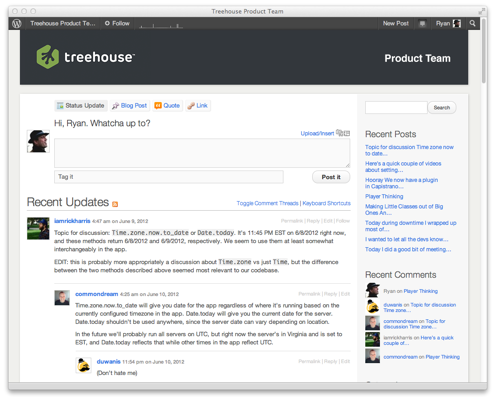
Treehouse is a fantastic resource for anyone interested in learning about HTML, CSS, iPhone apps, and web development in general. The company is hugely supportive of a work-from-home culture, and co-founder Ryan Carson has made it a priority to make remote work part of the company-wide goals and mission. Treehouse schedules company-wide meetings once a year where their 70 full-time employees and student interns get together to hang out and get to know each other. The team schedules monthly 15-minute videos where each member talks about big-picture ideas in the company, helping align everyone’s goals to the company’s mission. Treehouse employees use project management tools like Flow, Convoy and HipChat to stay integrated and decide how best to spend their time every day.


tumblr_m5ggoghlgt1rneiz8


3. WordPress (Automattic)


WordPress CEO Matt Mullenweg manages a global workforce of 260 people and decided that having an office is not the best way to run a successful company. He believes that the best way to gain access to the best engineering talent in the world is to have a distributed workforce. WordPress employees communicate with each other using P2, Google Hangouts and other online communication platforms. They organize team meetings every few months in a city of their choosing, using the funds that would otherwise be allocated to run a traditional office.


Automattic_Map

The Automattic team updates this world map with every member’s current location


4. Mozilla


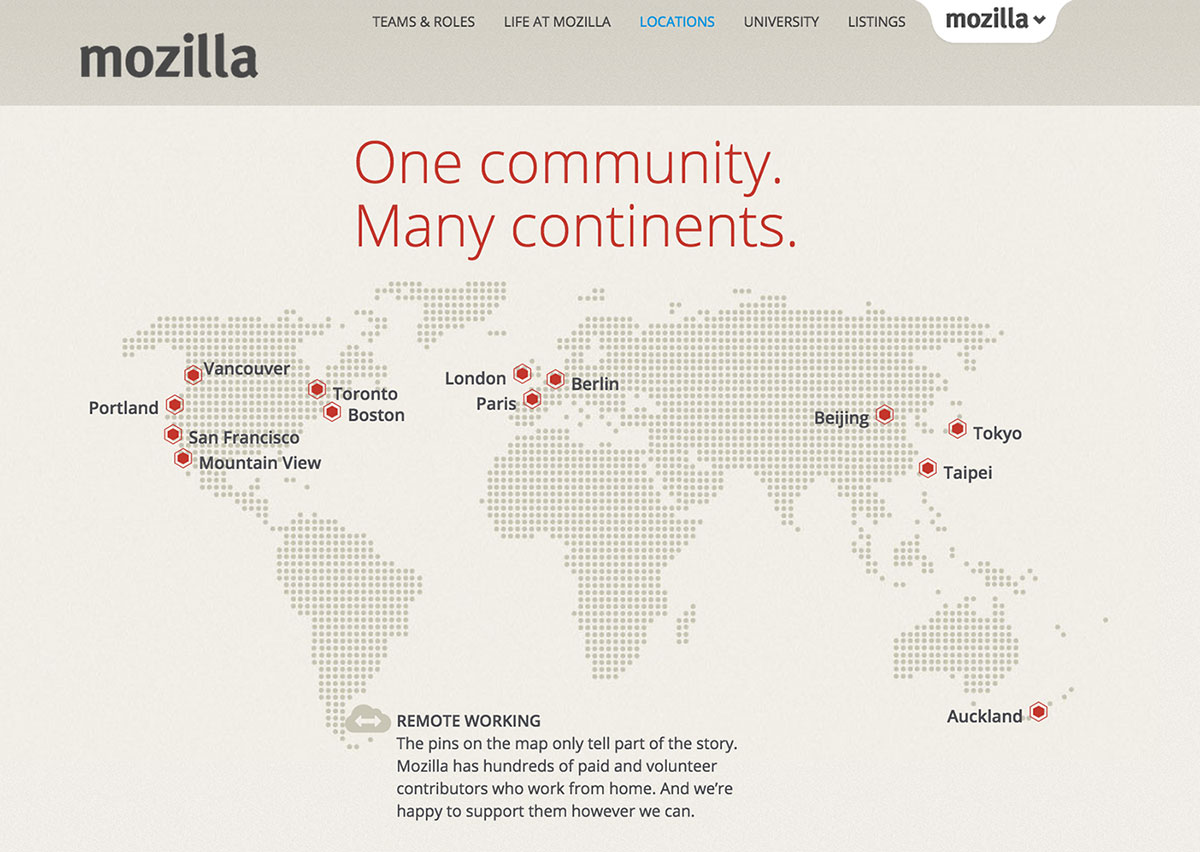
Mozilla is also big on the remote working culture. To them, forcing remote employees into an office is counter intuitive and counter productive. CEO Brian Bondy keeps his employees in the loop by encouraging them to simply call a meeting anytime they have anything to discuss. As in other remote-friendly tech companies, there are specific weeks where employees are flown in to meet in person. All of the company’s paperwork and operational material is completely transparent and available to every employee online.


mozilla


5. Buffer


Buffer has been on the remote work train since the company’s inception. Employees stay productive and on track by using apps like HipChat for communication, Sqwiggle for face-to-face contact, Hackpad for collaborating on documents and in-person get-togethers to connect as a team. When they do meet up, they don’t just stick to an office either. Buffer schedules retreats in fascinating places like Cape Town where work can blend with a little sightseeing, boating and safari action.


In this video Joel & Leo from Buffer discuss why they decided to be a remote team and some of the tools that help them collaborate:


These companies, and many others, are proving how remote work is a truly innovative option to keep employees happy, teams productive, and business successful. Some of our own team members are also working from remote locations, and we couldn’t be happier to collaborate with such talented individuals from anywhere their desk might be.


Products Seen In This Post:


Share on PinterestShare on Pinterest


getpaidtowrite-banner
5 Forward-Thinking Tech Companies That Love Remote Work

Tuesday, March 17, 2015

5 Forward-Thinking Tech Companies That Love Remote Work

Tech companies are embracing the idea of working remotely. Companies are realizing that it is a great way to cut down on overhead costs and take advantage of talent that might not exist in the same area code. With all the new technologies and apps available to startups, working remotely is easier and more effective than ever. Here are five forward-thinking tech companies that really love remote work:


1. Basecamp


The team at Basecamp (formerly 37Signals) created the project management app by the same name and the Ruby on Rails programming language. Dave Heinemeier Hansson, one of the partners, says that they are big supporters of working remotely and have been doing so for the last decade. In fact, he claims that 75% of the Basecamp team is working remotely. Their experiences led him and his co-founder to write a book titled REMOTE: Office Not Required about how employees and employers “can work together, remotely, from any desk, in any space, in any place, anytime, anywhere.” This video offers a great introduction to some of the remote workers in the Basecamp team and how they manage working outside of an office.


2. Treehouse


Treehouse is a fantastic resource for anyone interested in learning about HTML, CSS, iPhone apps, and web development in general. The company is hugely supportive of a work-from-home culture, and co-founder Ryan Carson has made it a priority to make remote work part of the company-wide goals and mission. Treehouse schedules company-wide meetings once a year where their 70 full-time employees and student interns get together to hang out and get to know each other. The team schedules monthly 15-minute videos where each member talks about big-picture ideas in the company, helping align everyone’s goals to the company’s mission. Treehouse employees use project management tools like Flow, Convoy and HipChat to stay integrated and decide how best to spend their time every day.


tumblr_m5ggoghlgt1rneiz8


3. WordPress (Automattic)


WordPress CEO Matt Mullenweg manages a global workforce of 260 people and decided that having an office is not the best way to run a successful company. He believes that the best way to gain access to the best engineering talent in the world is to have a distributed workforce. WordPress employees communicate with each other using P2, Google Hangouts and other online communication platforms. They organize team meetings every few months in a city of their choosing, using the funds that would otherwise be allocated to run a traditional office.


Automattic_Map

The Automattic team updates this world map with every member’s current location


4. Mozilla


Mozilla is also big on the remote working culture. To them, forcing remote employees into an office is counter intuitive and counter productive. CEO Brian Bondy keeps his employees in the loop by encouraging them to simply call a meeting anytime they have anything to discuss. As in other remote-friendly tech companies, there are specific weeks where employees are flown in to meet in person. All of the company’s paperwork and operational material is completely transparent and available to every employee online.


mozilla


5. Buffer


Buffer has been on the remote work train since the company’s inception. Employees stay productive and on track by using apps like HipChat for communication, Sqwiggle for face-to-face contact, Hackpad for collaborating on documents and in-person get-togethers to connect as a team. When they do meet up, they don’t just stick to an office either. Buffer schedules retreats in fascinating places like Cape Town where work can blend with a little sightseeing, boating and safari action.


In this video Joel & Leo from Buffer discuss why they decided to be a remote team and some of the tools that help them collaborate:


These companies, and many others, are proving how remote work is a truly innovative option to keep employees happy, teams productive, and business successful. Some of our own team members are also working from remote locations, and we couldn’t be happier to collaborate with such talented individuals from anywhere their desk might be.


Products Seen In This Post:


Share on PinterestShare on Pinterest


getpaidtowrite-banner
5 Forward-Thinking Tech Companies That Love Remote Work