Showing posts with label Don’t. Show all posts

Tuesday, April 14, 2015

What You Don’t Know About Calculating Percentage Margins in CSS

Most web designers think they know CSS pretty well. After all, there isn’t that much to it — a few selector types, a few dozen properties, and some cascading rules that you barely need to remember since they boil down to common sense. But when you get down to the nitty-gritty level, there are plenty of obscure details that few designers truly understand.


When I examined the results of a free CSS test I’ve offered online for the past six months, I discovered one question that almost no one got right. Of the thousands of people who took the test, fewer than 14% got it right.


The question boils down to this: How Do You Calculate Percentage Margins?


The Question


Say your site has a container div, and inside that, a content div:


Now, let’s give that content div a top margin:


.content 
margin-top: 10%;


Okay, so it’s 10% … but 10% of what? That’s the question that only 13.8% of people can answer correctly. And keep in mind: these people have access to Google!


What I love about this question is that it seems like the answer should be obvious. So much so, that I suspect most people just take a guess (and guess wrong). But maybe it doesn’t seem obvious to you. I mean, if you really use your imagination, there are many ways the browser could conceivably calculate a margin like this.


So how about if I narrow it down for you since the question in the test is actually multiple choice. Here are your options:


  • 10% of the content div’s height

  • 10% of the container div’s height

  • 10% of the content div’s width

  • 10% of the container div’s width

Remember, only 13.8% of people can pick the right answer from this list. That’s way worse than chance!


Look closely at the answers; you’ll see there are really only two things you need to know:


Container or Content?


First, is the size of the margin based on the size of the content div itself, or on the size of the container div?


Now this isn’t a gimme, but you can probably trust your instincts. If I set a div to be 50% of the width of its container, and then I want its left and right margins to fill the rest of the space, I’d naturally set them to 25% each (so the percentages add up to 100%). For that to work, percentage margins must be based on the dimensions of the container.


Sure enough, two thirds of people who take the test get this part of the answer right.


Width or Height?


Second, is margin-top’s size based on the width or the height of that element?


If you’ve been paying attention, you’re probably on your guard already. For so few people to pick the right answer, this has got to be a trick question, right?


And yet, I bet you can barely believe that the answer isn’t height. Well, it isn’t.


Yes, we’re talking about a top margin here. Yes, the size of that margin is a vertical measurement. Yes, if a block is 50% of the height of its container, and you gave it a top margin of 25%, you’d expect that to be 25% of the height of the container. And you’d be wrong.


Don’t feel bad if you thought it had to be height. Nearly 80% of people who take the test agree with you:


It Makes Sense… No, Really!


Still don’t believe it? Here’s a quote from the W3C CSS spec:


The percentage is calculated with respect to the width of the generated box’s containing block. Note that this is true for margin-top and margin-bottom as well.


The same goes for top and bottom padding, in case you were wondering. As for borders, it’s illegal to specify their width as a percentage.


So at this point, you’re probably thinking the creators of CSS are either bonkers, or they just made a really dumb mistake. But I’m here to tell you, there are two good reasons to base vertical margins on the width of the containing block:


Horizontal and Vertical Consistency


There is, of course, a shorthand property that lets you specify the margin for all four sides of a block:


margin: 10%;

This expands to:


margin-top: 10%;
margin-right: 10%;
margin-bottom: 10%;
margin-left: 10%;

Now, if you wrote either of the above, you’d probably expect the margins on all four sides of the block to be of equal size, wouldn’t you? But if margin-left and margin-right were based on the width of the container, and margin-top and margin-bottom were based on its height, then they’d usually be different!


Avoiding Circular Dependency


CSS lays out content in blocks stacked vertically down the page, so the width of a block is usually dictated entirely by the width of its parent. In other words, you can calculate the width of a block without worrying about what’s inside that block.


The height of a block is a different matter. Usually, the height depends on the combined height of its contents. Change the height of the content, and you change the height of the block. See the problem?


To get the height of the content, you need to know the top and bottom margins that are applied to it. And if those margins depend on the height of the parent block, you’re in trouble, because you can’t calculate one without knowing the other!


Basing vertical margins on the width of the container breaks that circular dependency, and makes it possible to lay out the page.


Ace the Class


So there you have it: the hardest question on the test, and now you can answer it. Want to know how you’d do on the rest of the test? Try it yourself. I promise, most of the questions are much easier than this one.


Meanwhile, I’m in search of a new toughest question! What detail of CSS do you think nobody knows?


Editor’s note: This is written for Hongkiat.com by Kevin Yank. Kevin has written about the web since 1999, with books on PHP, CSS, and JavaScript to his name. He’s also hosted podcasts, spoken at conferences, and produced video training, all about the Web. He now leads the development team at Sit the Test, a web application for making and taking online tests.


More on Hongkiat:


Now Read:
10 Hidden CSS3 Properties You Should Know


What You Don’t Know About Calculating Percentage Margins in CSS

Friday, April 10, 2015

8 Things You Don’t Want In a Startup Partner

Everyone you know is starting their own business – people from any age group: teenagers, adults in their 20s, 30s, 60s. And most people realize that going at it alone is a hard feat. This is when one brings up the issue of bringing in a partner, whether it’s to double the starting capital or to bring in a necessary set of skills you don’t have. And it’s a good plan actually.


IMAGE: Edyta Pawlowska

Many successful businesses start off as partnerships, like Google’s Sergey Brin and Larry Page, Facebook’s founder Mark Zuckerberg and his four other co-founders. The founders have someone to share the trials and tribulations of opening a startup with, and it also helps with easing stress levels.


Then again, there are some traits that you do not want to have in a startup partner and for some of us, these warning bells do not ring as early as it should. Instead of studying what traits company founders look for in their partners let’s look at what traits there are that we should distance ourselves from instead.


1. You don’t want a partner who is all talk, but has no proven track record.


There are three types of people in the world: those who are good at talking and doing, those who are terrible at talking but are great at doing, and those who are great at talking but are terrible in doing things. I have met all three, and among them the most dangerous is the last one.


They will make you believe that everything is going to be alright, that everything is under control, and if you are unlucky enough to fall for their sweet talk, you will soon find yourself wondering who was the real fool.


When interviewing for a partner, be sure to ask for their resume or CV and have them explain what they did in their previous work, projects, and other ventures. It also wouldn’t hurt to verify the things they say.


IMAGE: Sergio Garau

In the current state of the internet, most things are already online. A red flag for a potential partner is that when you do a quick search for their name and little to nothing comes up in the results. If your prospect partner has been successful in one industry or another, there should be some digital trails of his adventures on tweets, Linkedin and Facebook posts, blog posts, news clippings, even a personal website, or a mention in a press release.


Just think about it. Just about anyone can start a website anytime and slap their face there under a different name then claim that he or she had been a web designer for 30 years. Seek out their credibility and make them authenticate their authority.


2. You don’t want a partner who is inconsistent.


Startups are always on the line. No time or resources can afford to be wasted. If your partner decides on doing one thing today, and another the next day, you should be worried. It’s okay if you have enough resources to "waste", sometimes it is inevitable, particularly if you are aiming for innovation. But while you’re still in the process of figuring things out, you need to be laser focused.


That’s also probably the reason why you are looking for a partner, so that two people can focus on two important and bigger things.


You can easily spot an inconsistent person by looking at their resume. Have they handled a couple of jobs in the span of a year? Have they jumped from one project to another? It would also be prudent to ask for character references that you can contact and talk to. Think of it as a feedback gathering exercise. If your would-be partner is consistent, things will check out.


3. You don’t want a partner who is bad At dealing with people.


It’s a big world out there and there are plenty of people who have no idea what is culturally acceptable and what is not when dealing with other people. For example, a friend of mine told me how their company’s new partner shouted at him while they were at a public place. Being a tall foreigner, he definitely stood out and people were looking at him funny.


The point here is, if your prospect partner doesn’t know how to deal with people, that’s already a red flag. If he can’t treat people right, it’s going to hard to get people to like him. If you are the only person this person respects, but he doesn’t extend that courtesy to people who work under you, that’s a warning sign to go find another partner.


To know what the real deal is, you can give your prospect partner a trial run, an entire month of working with you and the entire team just to see how well they work with people. This is important because if your company takes off in the future, it is only expected that your partner will deal with even bigger players in the field. And you don’t want to go around facepalming whenever your partner opens his mouth.


IMAGE: Hobvias Sudoneighm

4. You don’t want a partner whom your employees hate.


Ok, maybe lacking a bit in social skills is still okay, but you have to pull the brakes when it results in people hating your partner. That’s a big no-no. You are building a team of superstars, not a film with a good cop and a bad cop.


You can easily spot a person whom your employees (current or future) will hate if you’ll just have them spend some time with everyone. Bring that prospect partner in, ask them to go around and talk to your current employees, eat lunch with everyone, and then at the end of the day ask your employees for their feedback.


This actually happened to me during my internship as a web developer. The company brought in an applicant, and at the end of the day, the manager asked us (employees and interns) to rate the person: if we liked him or not, and other comments. A multi-million dollar business actually took that into account. Why? Because they know that happiness in the workplace is crucial!


Things are going to be a lot harder to handle if you skip this, and brought in the partner anyways. There’s a post on reddit where by the user related how his co-founder was slowly derailing their company’s culture.


“My COO is starting to act like an a**hole with all new employees. He is giving them impossible deadlines for sometimes stupid demos for specific clients. He gets in their face and is always babbling and fighting with our CTO on how inefficient our new developing team is. […] Our culture is slowly derailing. I know I have time to correct but I can’t just fire him because he is the best at what he does.”


I don’t envy being in his position.


5. You don’t want a partner who has a lot of side projects.


It is understandable that skilled entrepreneurs will have at least a couple of projects going on at the same time, but if your prospect partner is not willing to sacrifice or loosen their leash on some of their projects to give more time to yours, take that as a sign that they are just treating you as another side objective.


Look for a startup partner who can dedicate a majority of their time working with you towards the same goals. In the same sense, you need to ask yourself what you are looking for a partner. Is it to bring in a new talent who will manage and cultivate a specific area in your company while you are busy on other parts of it?


Or is it so that you’ll have more time for yourself and other projects? If it’s the latter, then you might actually be the problem you are trying to avoid.


6. You don’t want a partner who has a bigger ego than you.


Every partnership starts with a tamed attitude. Both sides will be measuring up the other’s ego, trying not to force an idea too much, trying to be careful. And that is natural. It’s part of the process of becoming a team. But the problem lies when a big decision needs to be made, and both of you are on the opposing sides of the decision.


For example, you may want to lower your service’s pricing in order to get more clients, who would otherwise look for cheaper, offshore solutions, but your partner is against the idea because that would include lowering the company’s standards and even its image.


IMAGE: Krappweis

If your terms are 50-50 partnership, that means one can’t decide without the other. And if no one would relent, if no one is willing to compromise, if no one is willing to put their ego aside, that’s pretty much a failed partnership. The goal of partnering up with someone is to have someone pull you back to reality, to keep each other in check – not to dominate the decision-making process.


Here’s a good example of the troubles you may face if you team up with someone who has an abnormally big ego. It’s an interesting story of how hard it can get if you pick the wrong person.


Now, let’s go back to that 50-50 partnership.


7. You don’t want a partner who wants a 50-50 partnership.


There are different kinds of partnerships. There’s the "money partner" who finances everything while the "working partner" acts on everything, but the control and assets in the company is divided. Then there’s the "equal" partnership where both sides pitch in their money and time and work. It doesn’t matter what kind of partnership you form, the 50-50 kind is a bad idea. It’s a business killer.


60/40 is good, maybe even 52/48, but never go for 50-50. Being on the same "rank" is a recipe for disaster in the long run. There needs to be someone at the top who is at the very point of control and accountability, someone who has the final decision in everything. Even in sports there is a bigger authority aside from the teams that are playing, and that’s the referee. Without this, you’ll end up fighting if no one wants to compromise in order to reach a decision. There needs to be someone at the top, and there’s room for only one.


Here’s an example, a heartbreaking one, of a failed partnership. Kathleen King owned a successful, growing bakery in Southampton, NY. Since her homegrown, own-recipe bakery was growing exponentially, she decided to partner up with two brothers. They split the business evenly, that’s 33.33% ownership for each. Bad call. The brothers ultimately teamed up and kicked King out of her own business.


8. You don’t want a partner who agrees With everything you say.


Of all the things listed in this article, this is the most dangerous. While it is really nice to work with someone who you can agree with, the danger here is you might start believing that you can do no wrong. Everything you do is deemed correct – since no one is contesting your ideas and actions. This is called confirmation bias.


IMAGE: Imp Awards

Another thing that falls in this category are the skills your prospect partner has. Don’t look for someone who has the exact same skills as you have. Look for a partner who can complement your skills. If you are good with content creation, find someone who is good at content marketing. If you can sell anything, find someone who can create great products. You get the idea.


Conversely, you shouldn’t just agree on everything your partner says. The rule here is that if everyone in the room agrees on one thing, there needs to be at least one person who will play the devil’s advocate.


Final Word


Building a business from the ground up is a mountainous effort, but you can cut this by half by bringing in a partner to your business, one who will complement you in ways that you are lacking, and vice versa. You just have to find that one (or a couple of them) who has the same level of conviction as you have.


In reality, it is difficult to find the perfect business partner. There are many variables involved and in one way or another, you’ll have to compromise when you’re choosing too. One thing is for certain, though, you need to keep each other in check and quite possibly have everything down in writing, all terms and conditions and stands and policies, all the works.


Now Read:
The 7 Deadly Sins of Entrepreneurs


8 Things You Don’t Want In a Startup Partner

Saturday, March 21, 2015

5 Facebook Features You Probably Don’t Know

Last year, Facebook released Nearby Friends which tells you where you friend’s location is, and recently, Facebook is letting you make payments through Facebook Messenger. But did you know that Facebook keeps an archive of everything you have ever put on the social network, even stuff you’ve deleted before? Would you like to get a copy of this back?


We’ll show you how you can do this, plus a few other things — like how to make a donation to charity organizations, and save interesting stuff you find on your news feed to read later — you didn’t know you could do via/on Facebook.


1. Donate to Nonprofit Organizations


Did you know that you can donate to nonprofit organizations via their Facebook page? So far it is a small list of 19 organizations that include the American Cancer Society, American Red Cross, World Wildlife Fund and Malaria No More among others. To make your contributions go to their page, click on More right below the cover photo and choose Donate Now.


Enter your donation amount and payment information. Choose to make this a one-time donation or a recurring one then click Donate. 100% of your donations go to the nonprofit organization of your choice.


2. Retrieve Deleted Content


Have you ever wanted to retrieve certain information that you have accidentally deleted off Facebook? Well, you can. Simply go to your Facebook Settings page and click the Download a copy of your Facebook data link.


Click Start My Archive (in green) and enter your Facebook password when asked. Click Submit.


You will see this prompt box, and will need to click Start My Archive again. Wait for Facebook working for a few minutes and send you an e-mail containing download link for your data. Before you can download it, you will be prompted for your password again. Here is the kind of data you would expect from this download.


3. Save Now, Read Later


Every time you open your Facebook you will get a lot of news in your timeline. While most of them may be of interest to you, you might not have time to read them all. Chances are, once you’ve passed them, you won’t be able to find them again (unless they are heavily shared by everyone). To help you with this, use the Save option. It is found in the list of options under the dropdown button.


You can save items like links, places, movies, TV, music etc to check out later when you have the time. All your saved items will listed as “Saved”, which you can access from the left sidebar of your news feed.


4. Sync Facebook Calendar with Google Calendar


If you use Google Calendar to schedule all your important events but also have plenty of goings-on on Facebook, here’s how you can synchronize your Facebook Calendar with your Google Calendar to keep all your events in the same place.


First of all, go to the Facebook Event, you will see several events that involve you there. Then look at the bottom right corner of the page, you will find links Upcoming Events and Birthdays.


Right-click either one and select “Copy Link Address” or “Copy Link Location”.


Now go to Google Calendar. On the left side of the page there is the “Other Calendars” option, click the dropdown arrow button and select “Add by URL”.


Paste the link you copied earlier from Facebook, and click "Add Calendar". When the process complete, you can see the Calendar that you have imported appear in your Google Calendar.


5. Convert your Facebook profile into A Page


Did you know that you could convert your personal Facebook profile into a fan page? This way you can keep all your friends and followers rather than start from scratch.


To do this, first go to Profile to Page Migration. Then, choose a category for your Page. On the next page, select a subcategory and fill in required information. Lastly, click Get Started and follow the instructions provided. That’s it.


Note that this convertion is permanent, so it is better that you download a copy of your Facebook data (see #2 above) before you start migrating anything.


Now Read:
Facebook Housekeeping: 5 Things You Can Do Right Now


5 Facebook Features You Probably Don’t Know

Wednesday, January 28, 2015

10 Linux Desktop Environments You Probably Don’t Know

Unlike Windows and Mac OS, Linux offers a variety of desktop environments for its users. Each desktop environment (interface) has its own appearance, style and features and a user can install any one of these desktop environments on the basis of his/her requirements. Some of these desktop environments are also suited for machines with low hardware configurations.


If you’re not sure which Linux desktop environment is the most suitable for you then don’t worry, we’ve put together 10 Linux desktop environments along with their features to assist you in selecting the best one for your needs.


More on Hongkiat.com:


1. Cinnamon


Cinnamon is based on Gnome library files and designed for Linux Mint. It is an easy to use powerful desktop environment which is flexible and combines the traditional layout with advanced features.


Cinnamon consists of 3 main things: a single panel located at bottom, a clock and system tray and various other things located on the right, and the application menu on the left side of the screen. You can also customize the application menu by adding applications of your choice. To ensure that this runs smoothly, your machine should have a powerful graphics card and updated drivers. [Get it here]


2. GNOME 3.x


A few years back, GNOME (GNU Network Object Model Environment) was the most popular and widely used Linux desktop environment. The transition of GNOME to GNOME 2.x series brought simplicity and ease of use that attracted a large number of Linux users to move to the GNOME 2.x series.


GNOME 3.x was introduced to provide easy access to all of your data by integrating it with online accounts. Some other important features offered by GNOME 3.x are Activities Overview, side-by-side windows to view several documents, and an easy way to deal with notifications comfortably. [Get it here]


3. KDE


KDE (K Desktop Environment) is one of most popular Linux Desktop environments and also a contender for GNOME. It resembles the Windows Desktop so if you want to experience a desktop similar to Windows OS, this is the option for you. While KDE comes with a visually intriguing GUI and a bunch of powerful features, the combo makes it a resource-hungry desktop environment.


This means you may not be able to run it smoothly on older desktop/laptop computers with low hardware configurations. [Get it here]


4. MATE


Despite its popularity with earlier versions, the simplistic design of GNOME 3 didn’t sit too well with many GNOME users. The Linux community decided to continue development of GNOME 2 and designers came up with MATE. MATE offers a GNOME 2 environment with new features and improvements to assure users of an improved computing experience. [Get it here]


5. LXDE


LXDE (Lighweight X11 Desktop Environment) is a fast-performing desktop environment. It’s designed for cloud systems that usually have low hardware configurations (less CPU power and less RAM) and older desktop/laptop systems.


Although it is a lightweight desktop environment, it still has a simple and attractive user interface. It also provides multi-language support and on top of that it supports standard keyboard shortcuts and allows tabbed file browsing among other things. [Get it here]


6. Xfce


Fact: the abbreviation for Xfce doesn’t really stand for anything. It’s a traditional desktop environment which is very lightweight but in terms of functions, it is similar to GNOME 2. Xfce has its own lightweight programs as well as some GNOME programs to provide a balance in between performance and functions. [Get it here]


7. Unity


Currently, Unity is the native desktop environment for Ubuntu, replacing GNOME. It comes with an application dock which can be scrolled if the number of applications exceeds the screen view area. You can also search a particular file or application by typing its name in the searchbar. Unity works smoothly on a system with good hardware configuration. [Get it here]


8. Openbox


Openbox is a desktop environment which is lighter than LXDE and Xfce due to its minimalistic design and appearance. It is a highly configurable desktop environment and has a completely bare desktop which makes the loading process really fast. Right clicking anywhere on the desktop to open the application menu.


You can also combine the functionality of GNOME or KDE with the speed of Openbox to make your desktop faster and cleaner. Openbox is ideal for Linux users with low power systems. [Get it here]


9. Razor – Qt


Razor – qt is a fairly easy and lightweight desktop environment for Linux users. It bears similarities with KDE but it is designed to offer simplicity with speed. It comes with minimal built-in applications; you can install the applications you need yourself (find the list of third-party apps youc an get on Razor-qt here. It should work smoothly with older systems with low hardware configurations. [Get it here]


10. Xmonad


Xmonad is actually a tiling window manager which means instead of overlapping windows on your desktop, it will automatically arrange them in a non-overlapping order, leaving behind an organized desktop. It does not come with too much of a decorated user interface but that makes it a fast, user-friendly and stable desktop environment. [Get it here]


10 Linux Desktop Environments You Probably Don’t Know

Saturday, January 17, 2015

Free Online Photoshop Alternatives That Don"t Suck

Photoshop’s feature set is so staggeringly huge that it’s difficult or perhaps impossible to find a competitor that truly stacks up. That being said, it’s rare for someone to actually need all of those features in their workflow. In fact, for many quick design or photo editing needs, a lot of people can get by just fine with free online photo editors. The problem is, most of these online editors kind of suck. Fortunately, there are a few than stand out as not only usable, but actually pretty great. Here are six you should try.


Note: Many of these apps have pro features or versions, but all make good on the promise of being highly functional in their free iterations.


1. Pixlr


This web editor is by far the most powerful free Photoshop alternative you’ll find. Pixlr is easy to use and has many of the heavy-hitting editing tools that you can usually only find in paid programs, like cloning and color replacement. It’s the closest thing to free Photoshop you’ll find on the web.


free-online-photoshop-alternatives


2. Polarr


Out of all the apps listed, Polarr gives you the most control over photo effects and color selection. You can even create filters (called “dynamic styles” in the editor). The best editing options on it in my opinion are the artificial distortions and lens physics. They give digital pictures that film quality look.


free-online-photoshop-alternatives


3. Adobe Photoshop Express Editor


One of the many awesome things about Adobe is that they offer some of the image editing tools from their paid programs for free online. Adobe Photoshop Express Editor is pretty simple: basic (crop, re-size, general touch-up); adjustment (exposure, highlight, sharpen); and effects (crystallize, sketch, distort). But they are very effective. Some of the best features are found in the decorating tool sets. You can easily add text, sticky notes, costumes, and other fun stuff to your photos.


free-online-photoshop-alternatives


4. PicMonkey


Even if you have full access to the entire Photoshop suite, PicMonkey is a great alternative or complement to photo editing. The simple but powerful editing capabilities of this app will do wonders for your image. You can add different images together, set canvas backgrounds, add text, and much more.


free-online-photoshop-alternatives


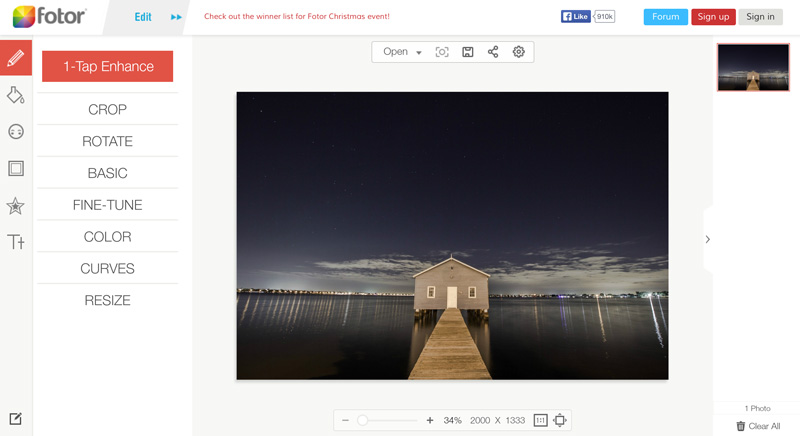
5. Fotor


Fotor is perfect for perfecting portraits. You can perform very detailed and delicate work, like adding or fixing makeup to someone’s face. You can even whiten teeth, remove blemishes, and do a little reshaping. Though it can lag at times, it’s a great app and you can really do a lot with the editing tools.


free-online-photoshop-alternatives


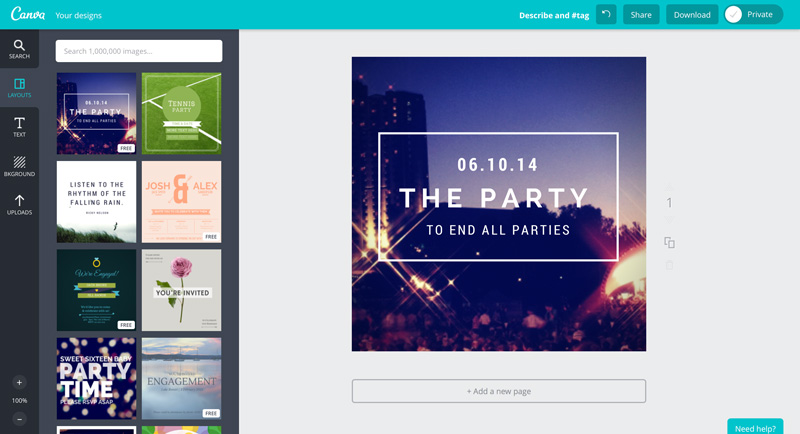
6. Canva


Most of the photo editors listed here are variations on similar programs to Photoshop, but Canva is something pretty different. It’s a powerful online tool that helps you create great looking designs of all types, even without any design experience whatsoever. You simply choose a template, customize the text and images, and you’re ready to go.


free-online-photoshop-alternatives


Which Free Online Photoshop Alternative Is Your Favorite?


By combining the strengths of these online Photoshop alternatives, you can get amazing results without paying a cent. Have you created anything in a free Photoshop alternative that you love? Post it below.


Free Online Photoshop Alternatives That Don"t Suck