Showing posts with label Good. Show all posts

Thursday, June 18, 2015

Writing Good CSS


I’m always trying to learn new things. However, I also try to learn ways to improve the way I already do things. Both at my full-time gig and for client side-projects, the thing I’ve always wanted to improve on was my CSS. I’ve always felt I’m pretty good when it comes to CSS, but I’ve always found it messy to read, and often hard to maintain.


What I’ve been trying to do, is find out what makes good, readable, maintainable CSS. I think I’ve come up with (and found) some ways to make this all possible.


The Problems


There are several things that bother me about CSS. The most common annoyances I have are:


  • repeating common code

  • browser prefixes

  • lack of comments

  • over qualified selectors

  • poor class names

When it comes to my personal projects, I take full responsibility for my code. I rarely comment my CSS, and often treat it as an afterthought. That’s just wrong.


For a long time I figured that my class names are “semantic” and it’s just me doing things, so there’s no need to explain the code, or little “hacks”, or anything.


Coming back to code on a long-standing project quickly proves this theory to be very wrong.


When it comes to code at work, I can’t take all the blame. In fact, part of the issue is the number of people who have had their hands in there.


Currently our team has seven of us who at some point have written CSS for our sites, with another 6-8 that have come and gone over the years. Each member of the team has varying levels of knowledge and ability regarding CSS.


As well, as is often the case with long-standing projects, some of the code is old. A lot of it is pre-CSS3, or pre-whatever-trend-was-cool-5-years-ago. In both cases, there were often different ways of doing things at the time it was written, and in some cases, a natural lack of knowledge.


I’ve also learned that some programmers will insist that their code is “self-documenting”. If you’re unfamiliar with that term, it translates to “my code has no comments”.


Solutions


While nothing is perfect, I believe there are things we can do to improve our code. I discovered CSS Guidelines by Harry Roberts a while back. Itt holds true to the promise of “High-level advice and guidelines for writing sane, manageable, scalable CSS”.


Comments

While CSS Guidelines gives specifics on comment styles, I personally just try to put something in to tell future me what I was thinking. I start every component with a comment representing the title, them details on the intent of the component.


When using a preprocessor I style specific comments to either be included with the CSS, or skipped by the preprocessor. I’m still working on this part, and trying to get into the habit of putting something, anything.


Object-orientation

Object-orientation is a programming paradigm that breaks big things into small things. From Wikipedia:


Object-oriented programming (OOP) is a programming paradigm that represents the concept of ‘objects’ […] which are usually instances of classes, [and] are used to interact with one another to design applications and computer programs.


When it comes to CSS, we call this object-oriented CSS, or OOCSS. The basic concept breaks apart the structure of the element, from the skin of the element. This means we can easily reuse any recurring design patterns, without necessarily reusing the specific implementation details at the same time. OOCSS focuses heavily on the reuse of code, which makes us faster, and can keep the size of our codebase down.


I think of structural aspects like skeletons; common frames that give constructs known as object. These objects are simple design patterns that are free from any cosmetics. We abstract the structure from a set of components in order to have a generic object.


We then optionally add the “skin” layer to our structure so we can give the abstractions a specific look and feel. For example (taken from CSS Guidelines):


/**
* A simple, design-free button object. Extend this object with a `.btn--*` skin
* class.
*/
.btn
display: inline-block;
padding: 1em 2em;
vertical-align: middle;


/**
* Positive buttons" skin. Extends `.btn`.
*/
.btn--positive
background-color: green;
color: white;


/**
* Negative buttons" skin. Extends `.btn`.
*/
.btn--negative
background-color: red;
color: white;


Here we see how the .btn class simply provides structure to an element, but has nothing concerning cosmetics. We can extend .btn with a second class, like .btn--positve to give that element more specific styling:


<button class="btn btn--positive">OK</button>

I much prefer to use multiple classes in my HTML, over using something like @extend in a preprocessor. This gives me more visibility in my HTML allowing me to quickly see what classes are applied to my element. It also means that my classes are not tightly bound to other styles in my CSS. It sort of helps OOCSS following the concepts of encapsulation.


BEM

BEM (Block, Element, Modifier), is a front-end methodology developed at Yandex. BEM is actually a very complete methodology, and I honestly haven’t dug into all the details, but what I’m concerned with is simply the naming convention.


I’m using BEM-like naming conventions. The concept is the same, but the exact syntax may differ slightly.


BEM places classes into three groups:


  1. Block: the root or base of a component

  2. Element: a component inside of a Block

  3. Modifier: a variation or extension of the Block

A very basic analogy (not an example):


.dog
.dog__tail
.dog--small

Elements are delimited with two underscores (__), and modifiers are delimited with two hyphens (–).


In the above analogy, we see that .dog is the Block, the root of element. Then, .dog__tail is an Element, it is a smaller part of a .dog Block. Lastly, .dog--small is Modifier, a specific variation of the .dog Block. You can also apply Modifiers to Elements. for example, we could have .dog__tail--short to again, specify a variation on the dog__tail Element.


In some cases I may want multiple words for Blocks, Elements or Modifiers. In any case, these are separated with a single hyphen (-), and classes are always written in lowercase.


Preprocessors

I’ve been spending time working CSS Preprocessors into my work flow, and so far, it’s been incredibly valuable. CSS Preprocessors take code that is written in a preprocessed language and convert them to good old CSS. They are not CSS, which means they are not bound be the same rules and limitations of CSS. While CSS is great, it doesn’t always allow us to easily do the things we’d like to do.


For example, one thing that would be really nice in CSS is variables. Maybe you want something to have the left margin of one element the same as the width of another, and suddenly someone decides that those numbers need to change. Since they’re the same number, and your layout might rely on that number, you have to change it more than one place. But with a varibale you could change it in just one place and have it reflect in the whole layout. Of course, there is a lot more to preprocessors than just variables, but that’s a start!


You obviously don’t have to use a preprocessor, but I think you’ll find most people who do, won’t go back. I know I won’t. The gain in flexibility, and increased readability are something I just can’t give up. Simply being able to use variables and mixins is enough to keep me hooked.


There are several preprocessors available, but the only two I’ve really looked at and used at all are LESS and SASS. Please take a look, and consider adding one of these to your workflow, you won’t look back.


Concluding


My real point here, is that CSS can be better. Everything can be better. Someone told me recently in a comment on a post on Reddit that “CSS doesn’t have semantics”. I wholeheartedly disagree. CSS 100%, without a doubt can be semantic.


Using OOCSS and BEM does, in fact, give your CSS a very semantic meaning. This doesn’t mean it’s easy right off the bat, but it’s well worth exploring. Combine that with CSS Preprocessors, and you have the potential for very readable, maintainable, and scalable CSS.


I’d also like to note that this not only makes your CSS (preprocessed or not) more readable, but also makes your HTML more readable, by applying semantic class names to elements.


TL;DR


Ok, maybe that was a lot – to summarize, write better CSS by doing this:


Object Oriented CSS:


  • each class does one thing — it does it well, it does it right

Block, Element, Modifier (BEM) style class names:


  • Block: .grid

  • Element: .grid__item (2 underscores)

  • Modifier: .grid--wide (2 hyphens)

Preprocessors are awesome:


The post Writing Good CSS appeared first on Speckyboy Web Design Magazine.


Writing Good CSS

Wednesday, May 20, 2015

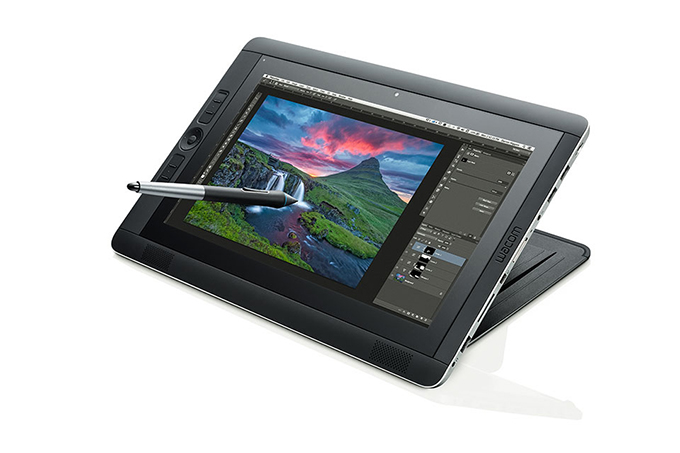
Wow, The New Cintiq Tablet Is Good Enough To Replace Your Computer

Since 2010, the iPad has been the tablet to have. And sure, the Microsoft Surface got some people excited, and later generations have improved substantially. But if you’re a graphic artist and you use a Cintiq monitor to get your job done, tablets don’t offer a lot of options. But now … well, things have changed.


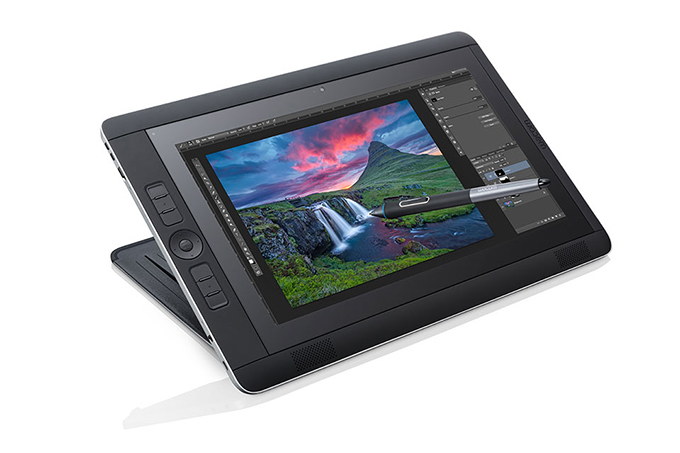
The Cintiq Companion 2 takes your Cintiq monitor, marries it with a Windows tablet, and gives you the best of both worlds. And if you’re a Mac person, no worries there either, because you can plug it in to your Mac or PC and use it as a connected tablet.


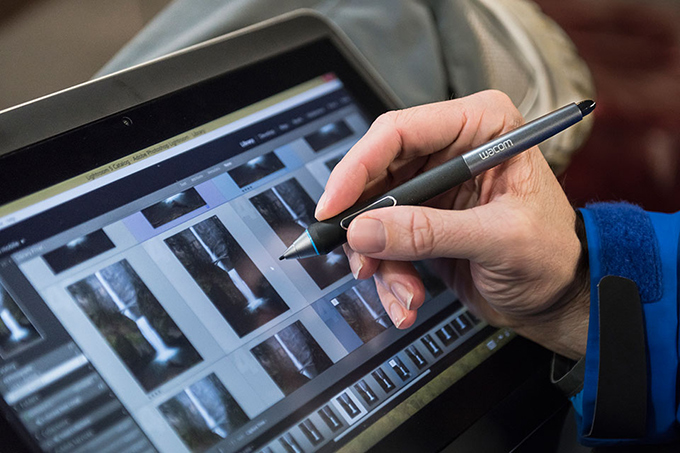
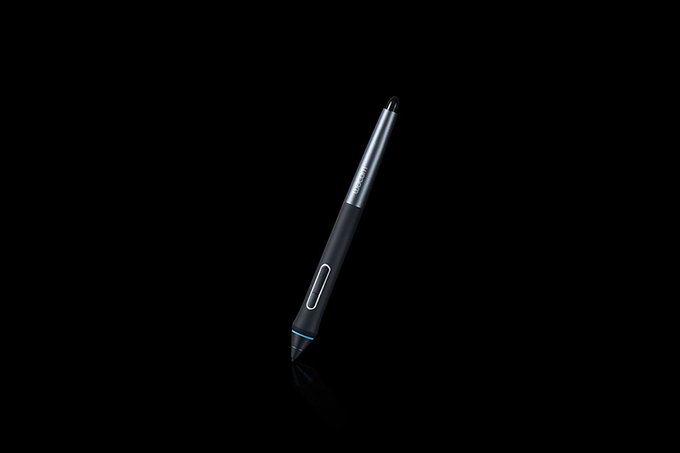
It comes with a battery-less Pro Pen that has 2048 pressure levels to give you that perfect touch. Plus, there’s a friction to the screen that makes it feel like you’re drawing on paper, not pushing a rubber nib across glass. And, like your Cintiq monitor, you have customizable shortcuts, too.


Prices on the Cintiq Companion 2 start at ,299 for the Intel Core i3 64GB model, and go up to ,499 for the Intel Core i7 with 512GB. Now that may seem like a lot of money at first to some, but considering that it’s also a full-fledged Windows PC running Windows 8.1, well, that’s not too shabby a deal.


Kevin Whipps is a writer and editor based in Phoenix, Arizona. When he’s not working on one of the many projects in his queue, he’s looking for fun and irreverent things online to share with his friends.
Wow, The New Cintiq Tablet Is Good Enough To Replace Your Computer

Friday, January 16, 2015

Where To Find New & Good Writers (Best 5)

So, you’re looking for a writer. Specifically, you’re looking for someone who can lure eyeballs to your website with words, the same way the Pied Piper can lure children away from Hamelin with music. That’s great! Even with the advent of robot journalists, there’s nothing quite like giving the human touch to virtual copy.


For that reason, you don’t want a writer who writes like she or he just wants to get the whole thing over with. You want someone who genuinely cares about the “what”, the “how”, and the “why” of your message.


And, quite frankly, you won’t find too many of these people on sites like Odesk, Elance, and Guru. (Even if you do find them, it’s pretty likely that their skills are worth much, much more than /hr.) You’ll make better use of your time searching for writers in places like:


Websites for Writers


Unless you’re a writer yourself, you probably don’t go anywhere near these sites. After all, what use would you have for blog posts like “How to Smash Writer’s Block to Bits” or “How to Schedule Your Writing Time?“


But if you don’t at least take a look at the bylines behind the aforementioned posts, you’ll be missing out on some mad writing skills. Writers usually lurk on sites like the ones on The Write Life’s 100 Best Websites for Writers for their daily dose of writing tips. Occasionally, they write a guest post or two for those sites, so they can add a handful of pieces to their portfolio and show the world that “writer” isn’t just a meaningless badge they brandish around for the heck of it.


Comments Sections


Aside from (guest) posting on writers’ websites, writers also let loose in these websites’ comments sections. Unlike most, these comments sections tend to be well-moderated, so there’s little to none of the usual vitriol you find in those places.


Also, the writers have links back to their own websites – either through their username or an in-comment link formatted as “(username) recently posted (blog post title) – so it won’t be difficult to check their stuff out and drop them a line.


Blogs in Your Niche


Okay, maybe wading through post after post about “how to write when you don’t feel like writing” isn’t in your wheelhouse. Maybe you want someone who talks less about writing and more about… a non-writing related thing that you want to write about. Does that make sense?


In that case, Google “(your niche) + blog”, and see if you can find any good leads from there. If you’re already following a blog in your niche (which you should do, by the way!), you may already have a writer who stands out to you in some way. Feel free to let them know that you have work available for them, because chances are they’ll be happy about the offer!


Referrals


Then again, maybe the writer you want isn’t available. That can be quite a letdown, not to mention a testament to that writer’s skill (why else would she or he be in demand?). What you can do is ask that writer if she or he knows someone else she or he can send your way.


By the way, it’s a good sign if a writer can – or will – refer someone to you. It means (1) the writer does everything she or he can to help clients, even indirectly; (2) the writer makes the time and effort to connect with others, which is a basic but valuable marketing skill; and (3) you made a good enough impression as a client to warrant referrals to people that the writer likes and trusts.


Social Media


LinkedIn isn’t the only place to find writers (although it’s certainly one of the best places). Savvy writers also set up Facebook pages, Twitter accounts, and even Google+ pages to let people know about their services.


If you type “freelance writer” in the search bars provided by these social networking sites, you’re bound to get a good lead or two. You can also comb through Facebook groups, filter Twitter hashtags for writers, or make a public post about your need for a writer.


Where Else?


“Where there’s written content, there are writers.” Keep that in mind while you search, and you won’t give up so easily if you’ve been online for hours and you still haven’t found “the one”. Writers have a knack for hanging around in the most unlikely places (because, hey, we’re a weird bunch), so keep your eyes peeled. Just like magic, you never know when or where these people might appear!


Finding the writer you want in the above-mentioned places can take more effort than you’re used to. But when you do manage to find that writer, your efforts will be nothing compared to what the writer can bring to your table: greater website traffic, stronger customer relationships, and, above all, a major boost in your self-confidence as an entrepreneur.


Do you have any stories to share about good writers, and how you found them? Share away in the comments section!


Where To Find New & Good Writers (Best 5)

Thursday, January 15, 2015

Where To Find New & Good Writers (Best 5)

So, you’re looking for a writer. Specifically, you’re looking for someone who can lure eyeballs to your website with words, the same way the Pied Piper can lure children away from Hamelin with music. That’s great! Even with the advent of robot journalists, there’s nothing quite like giving the human touch to virtual copy.


For that reason, you don’t want a writer who writes like she or he just wants to get the whole thing over with. You want someone who genuinely cares about the “what”, the “how”, and the “why” of your message.


And, quite frankly, you won’t find too many of these people on sites like Odesk, Elance, and Guru. (Even if you do find them, it’s pretty likely that their skills are worth much, much more than /hr.) You’ll make better use of your time searching for writers in places like:


Websites for Writers


Unless you’re a writer yourself, you probably don’t go anywhere near these sites. After all, what use would you have for blog posts like “How to Smash Writer’s Block to Bits” or “How to Schedule Your Writing Time?“


But if you don’t at least take a look at the bylines behind the aforementioned posts, you’ll be missing out on some mad writing skills. Writers usually lurk on sites like the ones on The Write Life’s 100 Best Websites for Writers for their daily dose of writing tips. Occasionally, they write a guest post or two for those sites, so they can add a handful of pieces to their portfolio and show the world that “writer” isn’t just a meaningless badge they brandish around for the heck of it.


Comments Sections


Aside from (guest) posting on writers’ websites, writers also let loose in these websites’ comments sections. Unlike most, these comments sections tend to be well-moderated, so there’s little to none of the usual vitriol you find in those places.


Also, the writers have links back to their own websites – either through their username or an in-comment link formatted as “(username) recently posted (blog post title) – so it won’t be difficult to check their stuff out and drop them a line.


Blogs in Your Niche


Okay, maybe wading through post after post about “how to write when you don’t feel like writing” isn’t in your wheelhouse. Maybe you want someone who talks less about writing and more about… a non-writing related thing that you want to write about. Does that make sense?


In that case, Google “(your niche) + blog”, and see if you can find any good leads from there. If you’re already following a blog in your niche (which you should do, by the way!), you may already have a writer who stands out to you in some way. Feel free to let them know that you have work available for them, because chances are they’ll be happy about the offer!


Referrals


Then again, maybe the writer you want isn’t available. That can be quite a letdown, not to mention a testament to that writer’s skill (why else would she or he be in demand?). What you can do is ask that writer if she or he knows someone else she or he can send your way.


By the way, it’s a good sign if a writer can – or will – refer someone to you. It means (1) the writer does everything she or he can to help clients, even indirectly; (2) the writer makes the time and effort to connect with others, which is a basic but valuable marketing skill; and (3) you made a good enough impression as a client to warrant referrals to people that the writer likes and trusts.


Social Media


LinkedIn isn’t the only place to find writers (although it’s certainly one of the best places). Savvy writers also set up Facebook pages, Twitter accounts, and even Google+ pages to let people know about their services.


If you type “freelance writer” in the search bars provided by these social networking sites, you’re bound to get a good lead or two. You can also comb through Facebook groups, filter Twitter hashtags for writers, or make a public post about your need for a writer.


Where Else?


“Where there’s written content, there are writers.” Keep that in mind while you search, and you won’t give up so easily if you’ve been online for hours and you still haven’t found “the one”. Writers have a knack for hanging around in the most unlikely places (because, hey, we’re a weird bunch), so keep your eyes peeled. Just like magic, you never know when or where these people might appear!


Finding the writer you want in the above-mentioned places can take more effort than you’re used to. But when you do manage to find that writer, your efforts will be nothing compared to what the writer can bring to your table: greater website traffic, stronger customer relationships, and, above all, a major boost in your self-confidence as an entrepreneur.


Do you have any stories to share about good writers, and how you found them? Share away in the comments section!


Where To Find New & Good Writers (Best 5)

Friday, November 28, 2014

Can Good Design Be Asymmetrical?

Today’s world bombards people with content. In order to make a new site or ad stand out among the others, it must bring a little something extra to the table. Most websites utilize symmetry to their advantage, but creators forget that asymmetry can be just as effective. Symmetrical design has become commonplace, so asymmetry can be an eye-popping way to garner extra attention.


Unfortunately, asymmetry can be a difficult concept to master, leading many designers to dismiss it altogether. When designers shed their misconceptions and give it a chance, they expand their horizons and create more memorable content.


Learn Web Design Series


Welcome back to our series on learning to be a web designer. Remember from last time that we’re not talking about code, like HTML and CSS, but the foundational principles of design. Simple lessons that will improve your ability to create an aesthetically pleasing end product for your clients. Here are a couple of other posts in this series:


Using White Space


One common misconception about white space is that it has to be white. It can be any color, so it is more accurately referred to as negative space. Any space in a design that is not occupied by the subject(s) of the image qualifies as negative space. Many creators feel the need to cover this space in order to make an image complete.


In reality, the completeness of a piece has nothing to do with the amount of content on each side. The blank space on one side can balance the content on the other. When used correctly, this tactic makes a big impact. This method intrigues people because they are not accustomed to seeing it. Unfortunately, creating a balanced asymmetrical piece is not as simple as it sounds.


Creating Asymmetrical Balance


Common Practices


The terms “asymmetrical” and “off-balance” are not interchangeable. Designs that lack symmetry are still capable of balance. Most asymmetrical designs use text to fill in the blank areas, like in this example. The theme uses a text block on the right to balance out the image on the left. This is a well-executed design, but designers should remember that white space is not wasted space, and it doesn’t always need to be covered up.


Blank, Not Boring


When utilizing blank space, designers must not forget the importance of balance. The amount of white space appropriate for a page is entirely dependent upon the size of the subject. This theme from Creative Market demonstrates how proper asymmetrical balance can automatically bring the viewer’s eye to the focal point. Since human eyes usually migrate to the left of the page first, this design emphasizes the text. The page looks clean and well-organized despite the fact that it is asymmetrical.


Asymmetry and Minimalism


One example of a company that uses white space to produce balance is Apple. With Apple banners, the white space is actually white because it complements the color of the products. Apple chooses a minimalist approach that has proven successful for the company. In a world where flashy advertisements constantly vie for viewer attention, Apple’s simple approach is refreshing to the eye.


assymetrical-designs


Effects That Asymmetry Can Produce


The second a designer adds asymmetry to his creative arsenal, he becomes a more versatile designer. Throwing symmetry to the wind can communicate many different ideas. Some of the most notable include:


Serenity


Nicely balanced designs with a lot of white space, like the STUDIO Airport website, give viewers the impression of elegance and quality.


assymetrical-designs


Chaos


If the design calls for something a little edgier, feel free to harness the off-kilter effect that asymmetry produces when the balance is slightly shifted.


assymetrical-designs


Motion


Asymmetry can be used to make motion-centered photo like the one below seem more life-like.


assymetrical-designs


Why Bother?


Asymmetry is an unapologetic way to bring the focal point of your piece to attention. It can intensify a design or simply show users something different. This powerful design concept may be difficult to master, but it makes your work more memorable for your audience. Viewers are sure to appreciate this much-needed deviation from the norm.


Header image created using neourban hipster office desktop by RaumRot.


Can Good Design Be Asymmetrical?