iPixel Creative is a Singapore web design and development Company. At iPixel Creative, we provides web design solution which helps your company stand out from the competitors. Our Solutions includes web design, website development, cms development, ecommerce solution and hosting solutions.
Everyone loves playing the classic PAC-MAN arcade game, and now you can do just that — in your own neighborhood — using Google Maps.
On Your Desktop
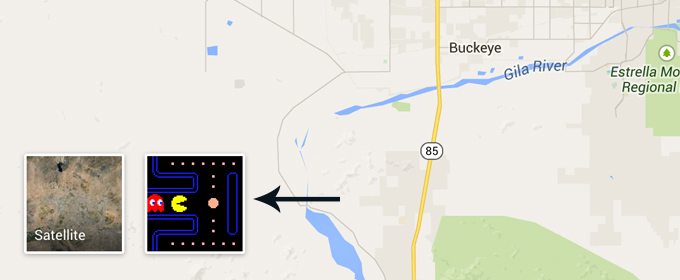
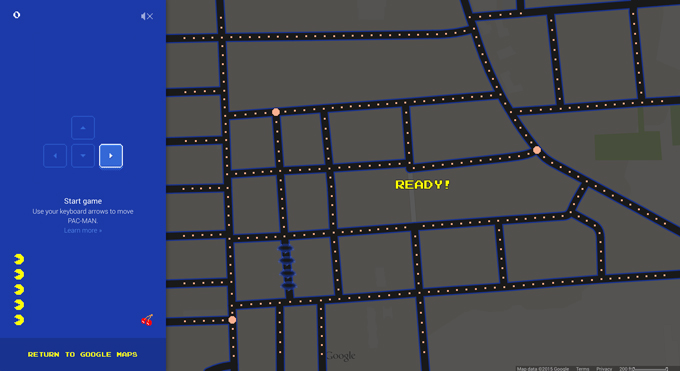
Go to maps.google.com, and look in the bottom left corner. There should be a little square there with a shot of a PAC-MAN game. While hovering over it, you’ll see a square appear in the center of the map that reads, “Ready!” Click on the PAC-MAN square and you’re off to the races — probably.
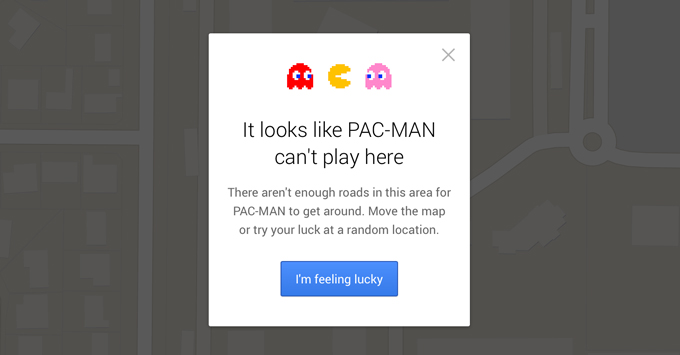
The game doesn’t work with every neighborhood, mostly because some don’t have enough streets. When it does work, it’s a ton of fun. Just use your arrow keys to get around and enjoy!
On Your Phone
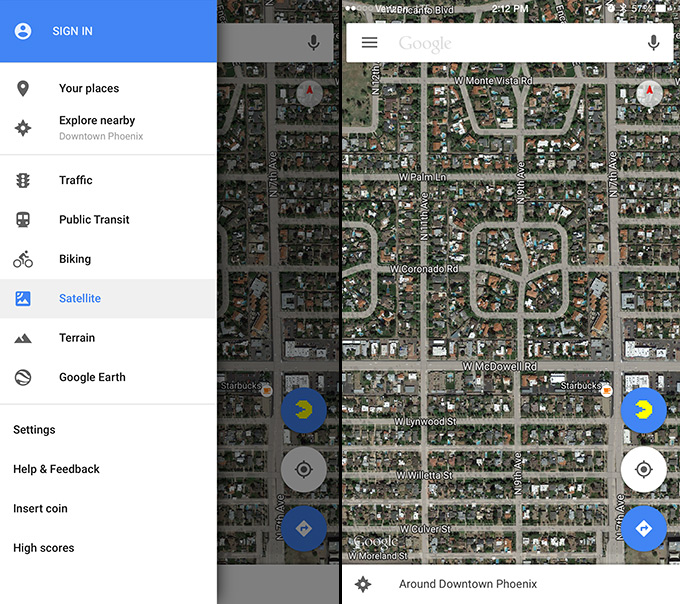
If you have the Google Maps app on either your iPhone or Android device, you can do the same thing. Tap the three lines in the upper left-hand corner, then select “Insert Coin.”
This is where things get cryptic.
You’re now taken to a page that reads, “Play PAC-MAN in Google Maps,” that gives you clues to locations on the map where you can play the game. Most of them are pretty hard to figure out, but one I nailed right away because I happen to live there.
Go to Phoenix, Arizona, and the intersection of W. McDowell Road and N. 7th Ave (it’s just north of Downtown). Play with your zoom a little bit, and the blue and yellow PAC-MAN symbol will pop up on the right-hand side. Press that and you can now swipe away to your heart’s content.
This is likely all in honor of April Fool’s Day, so your time is limited. But in the meantime, get after it and start playing PAC-MAN in your neighborhood!
Kevin Whipps is a writer and editor based in Phoenix, Arizona. When he’s not working on one of the many projects in his queue, he’s looking for fun and irreverent things online to share with his friends. You"ve Got To Try The Pac-Man Google Maps Game
Free psd game UI concept containing all you need to design a successful game – login, settings, missions and other screens. These graphics will surely add a more fresh look to your projects. Download now for free!
Free psd game UI concept containing 40 unique buttons and screens. We’ve created these website elements in a fun, cartoon style that will surely impress visitors and clients. The elements were made with a vibrant color scheme, which gives them a very clean and fresh look.
Don’t worry about editing the game UI concept set – it’s as easy as pie. We have not flattened the layers and have grouped and named them properly to make the web UI set completely customizable.
Consider downloading these free psd game UI concept elements as they will surely come in handy one time or another. All you have to do is click on the Free Download button below!
Need more UI items for your projects? Then be sure to check out our Web Elements sectionand pick whatever suits your needs.
Free PSD Game UI Concept
Resolution: 1750×4550 px File Format: PSD File Size: 18,3 MB Number of Items in Set: 40 Author: Free PSD Files
Note that if you want to spread the word about our freebie, you need to link back to this post. Links to download page or download archive are not allowed.
We need to talk about Facebook games. I believe if you’re on Facebook, you are either on the team that plays games, or the team that does not. The former basically taps into Facebook for favors from friends while the latter runs the "Please do not invite me anymore" recording on loop.
The bad news is, this is going to keep going on for as long as you are still on Facebook. The good news is, you don’t have to sever ties with friends who "just don’t get it that I do not want to be a part of their Villes". The what-you-should-know news is that whether you play Facebook games or not, there are things that you can do to better manage this.
So you get a Facebook notification only to find out that it is an invitation by so-and-so to play games. This is starting to frustrate you because it’s the umpteenth time you have asked your friends nicely to stop doing this.
The thing is, for almost all Facebook games, there is the "Invite All" or "Send to All" option readily available. Certain games (but not all) may have collected your friends who are already on the game on a smaller list. In both cases, the urge to be lazy and just send requests to everyone on the list – instead of picking the names one by one – is strong.
Basically Facebook game players see your messages, but Facebook does not make it easy for them to choose who not to spam – and there is nothing you can make them do about it.
But you can stop getting notifications, and stop receiving their updates as well as requests.
To Stop Getting Notifications
1. When you receive a Facebook notification on your desktop, click on the notification icon for a dropdown of all your notifications and locate the game notification.
2. However near the right side of the bar and you will see a circle and a cross appear. The circle gives you the Mark as Read option. The cross allows you to turn off notifications. Click on the cross.
3. Click Turn Off. And you will no longer receive notifications from said game. Do this once for each game.
To Stop Seeing Game Updates
1. On your Facebook feed, look for any game-related posts, like these:
2. To the right of the name of the game, you will find an arrow-down button. Click on it to see a dropdown menu.
3. You will see several options:
(1)I don’t want to see this will help you block that single post.
(2)Unfollow [friend] will ensure you no longer see posts from said person, including non-game-related ones.
(3)Hide all from [game] will block updates from any friend related to that game.
4. Pick any of the option above. I usually go with Option #3. Note that you will have to do this for each and every game, one at a time.
To Block Game/App Invites
This is for those who have too many invites from too many games from too many friends. The fastest way to get rid of all this drama is to block those invites in one go. Here’s how:
1. On your Facebook main page, go to the far right at your top menu bar. Click on the dropdown arrow and click on Settings.
2. On the left sidebar, choose Blocking and you will be taken to the Manage blocking section.
3. To Block app invites from someone, go to that section (third from the top) and type in his or her name. The field autocompletes so you can click on the person’s name or press Enter. You will no longer receive app invites from that person. Don’t worry, your friends probably won’t notice if you do not respond to their invites.
4. While you’re there, you can head down two more sections to the Block apps section and type in the games you want to block unconditionally. The field autocompletes too so you can take a stab at what the game name contains like Candy or Ville or Pirate, and click the app to single it out.
So far so good? Now, share this post with a fellow friend who is frustrated with game gangsters who can’t stop making game requests he or she can’t refuse.
I Play Facebook Games
I come in peace, and a proposition. If you want to play Facebook games, do it on a separate Facebook account. All you need is a second email address, which I think most people already have.
You get two benefits from this: you get to avoid the wrath of your friends, and secondly you get to tap into a world of Facebook game players who share your level of enthusiasm when playing the same games.
They don’t even have to be people you know. People who play Facebook games usually play multiple games, are active in game forums, and add tons of friends for help and favors to advance in the game. You will feel right at home.
There are two drawbacks that I know of. First, you will probably need to start from scratch for most of your games because I do not know if you can unlink your Facebook account from the game and link another Facebook account to it while keeping your most current progress (if you find out, let us know).
Secondly, since Facebook has yet to allow multiple account sign-ins on their Facebook mobile apps, you may need to choose which Facebook account to have on your mobile – I’m just going to leave this dilemma here, and move on.
Wrap Up
Having two Facebook accounts helps you separate your game addiction from what you do outside of it. Sure, there are implications of game addictions but let’s not go into that in this post. Truth is, there are many things you yourself can do rather than just ask people to stop sending game requests and invites – and now that you know, send this to someone who you think may need this.
We need to talk about Facebook games. I believe if you’re on Facebook, you are either on the team that plays games, or the team that does not. The former basically taps into Facebook for favors from friends while the latter runs the "Please do not invite me anymore" recording on loop.
The bad news is, this is going to keep going on for as long as you are still on Facebook. The good news is, you don’t have to sever ties with friends who "just don’t get it that I do not want to be a part of their Villes". The what-you-should-know news is that whether you play Facebook games or not, there are things that you can do to better manage this.
So you get a Facebook notification only to find out that it is an invitation by so-and-so to play games. This is starting to frustrate you because it’s the umpteenth time you have asked your friends nicely to stop doing this.
The thing is, for almost all Facebook games, there is the "Invite All" or "Send to All" option readily available. Certain games (but not all) may have collected your friends who are already on the game on a smaller list. In both cases, the urge to be lazy and just send requests to everyone on the list – instead of picking the names one by one – is strong.
Basically Facebook game players see your messages, but Facebook does not make it easy for them to choose who not to spam – and there is nothing you can make them do about it.
But you can stop getting notifications, and stop receiving their updates as well as requests.
To Stop Getting Notifications
1. When you receive a Facebook notification on your desktop, click on the notification icon for a dropdown of all your notifications and locate the game notification.
2. However near the right side of the bar and you will see a circle and a cross appear. The circle gives you the Mark as Read option. The cross allows you to turn off notifications. Click on the cross.
3. Click Turn Off. And you will no longer receive notifications from said game. Do this once for each game.
To Stop Seeing Game Updates
1. On your Facebook feed, look for any game-related posts, like these:
2. To the right of the name of the game, you will find an arrow-down button. Click on it to see a dropdown menu.
3. You will see several options:
(1)I don’t want to see this will help you block that single post.
(2)Unfollow [friend] will ensure you no longer see posts from said person, including non-game-related ones.
(3)Hide all from [game] will block updates from any friend related to that game.
4. Pick any of the option above. I usually go with Option #3. Note that you will have to do this for each and every game, one at a time.
To Block Game/App Invites
This is for those who have too many invites from too many games from too many friends. The fastest way to get rid of all this drama is to block those invites in one go. Here’s how:
1. On your Facebook main page, go to the far right at your top menu bar. Click on the dropdown arrow and click on Settings.
2. On the left sidebar, choose Blocking and you will be taken to the Manage blocking section.
3. To Block app invites from someone, go to that section (third from the top) and type in his or her name. The field autocompletes so you can click on the person’s name or press Enter. You will no longer receive app invites from that person. Don’t worry, your friends probably won’t notice if you do not respond to their invites.
4. While you’re there, you can head down two more sections to the Block apps section and type in the games you want to block unconditionally. The field autocompletes too so you can take a stab at what the game name contains like Candy or Ville or Pirate, and click the app to single it out.
So far so good? Now, share this post with a fellow friend who is frustrated with game gangsters who can’t stop making game requests he or she can’t refuse.
I Play Facebook Games
I come in peace, and a proposition. If you want to play Facebook games, do it on a separate Facebook account. All you need is a second email address, which I think most people already have.
You get two benefits from this: you get to avoid the wrath of your friends, and secondly you get to tap into a world of Facebook game players who share your level of enthusiasm when playing the same games.
They don’t even have to be people you know. People who play Facebook games usually play multiple games, are active in game forums, and add tons of friends for help and favors to advance in the game. You will feel right at home.
There are two drawbacks that I know of. First, you will probably need to start from scratch for most of your games because I do not know if you can unlink your Facebook account from the game and link another Facebook account to it while keeping your most current progress (if you find out, let us know).
Secondly, since Facebook has yet to allow multiple account sign-ins on their Facebook mobile apps, you may need to choose which Facebook account to have on your mobile – I’m just going to leave this dilemma here, and move on.
Wrap Up
Having two Facebook accounts helps you separate your game addiction from what you do outside of it. Sure, there are implications of game addictions but let’s not go into that in this post. Truth is, there are many things you yourself can do rather than just ask people to stop sending game requests and invites – and now that you know, send this to someone who you think may need this.
Free psd mobile game GUI that can be used to make a fun application with a clean and fresh look. The set includes any web element you could possible need to make a 2D mobile game. Go ahead and grab the kit now for free!
Free psd mobile game GUI with over 50 buttons and panels that has a fun, colorful, cartoony look and suitable for 2D mobile game designs.
The objects, which are included in the source file, are the most important elements of a typical 2D mobile game:
Levels
Options
Login
Paused
Skills
Warning
Buttons
Progress Bars
Social Media icons
Each of these buttons and screens are fully layered, properly named and grouped for the user’s convenience. With just a few clicks in Adobe Photoshop you could easily change their shape, size, colors and text.
Just click on the Free Download button below and use them in your next web project.
Need more UI items for your projects? Then be sure to check out our Web Elements section and pick whatever suits your needs.
Free PSD Mobile Game GUI
Resolution: 1300×2400 px File Format: PSD File Size: 2,92 MB Fonts: Cartwheel, ModernPictograms Number of Items in Set: 55 Author: Free PSD Files
Note that if you want to spread the word about our freebie, you need to link back to this post. Links to download page or download archive are not allowed.