
Grab the Graphic Supplies Bundle while it’s hot and save 82% off the original price.
FEATURES:
– AI, ABR, PNG files
– Over 1000 elements
– Bonus stuff
– Guides and Help files


Graphic Supplies Bundle – Over 1,000 Vector Elements
Grab the Graphic Supplies Bundle while it’s hot and save 82% off the original price.
FEATURES:
– AI, ABR, PNG files
– Over 1000 elements
– Bonus stuff
– Guides and Help files

Christmas Elements pack comes with elements that you can use in print magazines, web, brochures, flyers and other projects. Christmas Elements comes in EPS and AI file formats and is suitable to use in your personal and commercial projects.
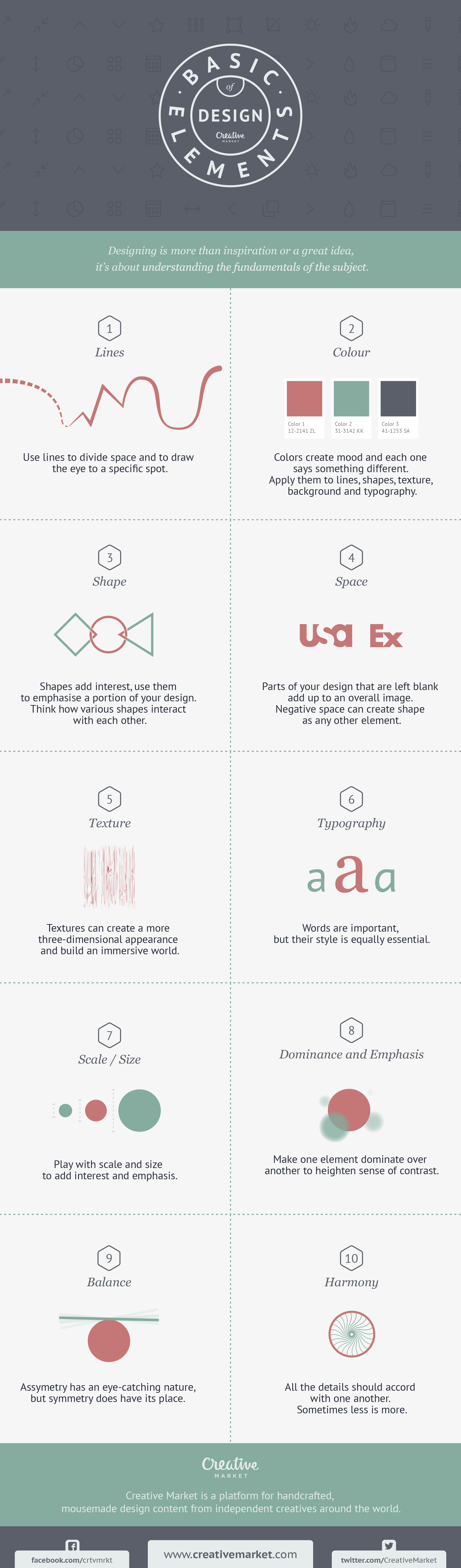
Let’s get back to the basics and talk about design 101. What critical components and concepts do you need to understand before tackling a functional design? One of our most popular, evergreen posts answers this question by outlining ten basic elements of design. Today, we’re following that up with a beautiful infographic summarizing all ten elements. Enjoy!
It is now common to see certain elements in a site fixed to a position when you scroll up or down the site e.g. the navigation menu, the header or the sidebar. This allows for the element to be readily available regardless of the user’s position.
Called a sticky element, this can be achieved just by using CSS, however, using this method, the effect is not reliable across multiple browsers. That is why we’ve put together a handful of JS libraries and jQuery plugins that will allow you to achieve this particular UX design with little to no hassle.
Waypoints is a library to execute a function based on the element position in the viewport. It comes with an shortcut function that makes that element “sticky”. You can customize the scrolling direction — up, down, and even right and left — as to which the element should stick within the viewport.

With StickyKit, not only can you make an element stick within the viewport, but you can also make them stick within the parent element you designate to multiple elements at once. The plugin also comes with some advanced settings including custom Events and Triggers.

StickyJS is an easy-to-use jQuery sticky plugin that does what it says. The plugin works out of the box. Yet, if you need some customization, it comes with Options/Settings, Custom Methods and Events.

A sticky site header will take up valuable vertical space that makes a difference when you view the site on mobile. Headroom is a JavaScript library that will make your sticky header smart; the header will be hidden when users scroll down the page and show up upon scrolling up.

Makefixed lets you make elements be fixed dynamically as users scroll the page. Just call the makeFixed() function on the element you want fixed. Check the demo to see it on action.

Midnight allows you to stick multiple headers / elements and switch between them based on their position within the document (DOM tree), check out the demo to see what I mean. In addition you can change their color on the fly simply by adding the data-midnight attribute with the specified color name.

ScrollMagic has advanced features to add interaction, during a page scroll. You can pin elements from specific scroll positions, add animation based on scroll position, or even make an awesome parallax effect. The demo gives you some insights of what this plugin can do.

onScreen is similar to Waypoints — it allows you to execute functions as the element is entering, leaving, or reaching certain positions within the browser viewport.

jQuery Pin is a small jQuery plugin to “pin” or “unpin” elements to a position, when you scroll the page. My most favorite part of this plugin is the option to disable it at certain viewport widths.

Sticky Float allows us to give elements a fixed position that is relative to its parent. You can set the sticky option according to your needs with the provided parameters and by changing the value. Catch the demo here.

Zebra Pin is a lightweight plugin to make any element pin to their container. With this plugin you can add "sticky-ness" to elements in your project like to your navigation, sidebars, headers and footers, or other elements that you want to keep visible when users scroll down. Check out the demo.

With HC-Sticky, you can make sticky elements that refer to its container, to any given element, or to the document itself. This plugin has some options that you can adjust to your need, like distance from the top and bottom to start floating, and other options.

Sticky Mojo is a lightweight, fast, and flexible jQuery plugin to make awesome sticky elements. It’s compatible with modern browsers and will degrade gracefully in IE.

If you want make single page navigation which sticks when one scrolls down, this library is for you.Sticky Navbar will put the navigation at the top of the browser window and highlight the anchor link to connect to the corresponding section on your page. You can also add Animate.css to beautify the navigation effect.

StickyStack will make elements stack with another when users scroll the element and reach the top of the viewport. With this library, your long page will transform into stacked cards.

It is now common to see certain elements in a site fixed to a position when you scroll up or down the site e.g. the navigation menu, the header or the sidebar. This allows for the element to be readily available regardless of the user’s position.
Called a sticky element, this can be achieved just by using CSS, however, using this method, the effect is not reliable across multiple browsers. That is why we’ve put together a handful of JS libraries and jQuery plugins that will allow you to achieve this particular UX design with little to no hassle.
Waypoints is a library to execute a function based on the element position in the viewport. It comes with an shortcut function that makes that element “sticky”. You can customize the scrolling direction — up, down, and even right and left — as to which the element should stick within the viewport.
With StickyKit, not only can you make an element stick within the viewport, but you can also make them stick within the parent element you designate to multiple elements at once. The plugin also comes with some advanced settings including custom Events and Triggers.
StickyJS is an easy-to-use jQuery sticky plugin that does what it says. The plugin works out of the box. Yet, if you need some customization, it comes with Options/Settings, Custom Methods and Events.
A sticky site header will take up valuable vertical space that makes a difference when you view the site on mobile. Headroom is a JavaScript library that will make your sticky header smart; the header will be hidden when users scroll down the page and show up upon scrolling up.
Makefixed lets you make elements be fixed dynamically as users scroll the page. Just call the makeFixed() function on the element you want fixed. Check the demo to see it on action.
Midnight allows you to stick multiple headers / elements and switch between them based on their position within the document (DOM tree), check out the demo to see what I mean. In addition you can change their color on the fly simply by adding the data-midnight attribute with the specified color name.
ScrollMagic has advanced features to add interaction, during a page scroll. You can pin elements from specific scroll positions, add animation based on scroll position, or even make an awesome parallax effect. The demo gives you some insights of what this plugin can do.
onScreen is similar to Waypoints — it allows you to execute functions as the element is entering, leaving, or reaching certain positions within the browser viewport.
jQuery Pin is a small jQuery plugin to “pin” or “unpin” elements to a position, when you scroll the page. My most favorite part of this plugin is the option to disable it at certain viewport widths.
Sticky Float allows us to give elements a fixed position that is relative to its parent. You can set the sticky option according to your needs with the provided parameters and by changing the value. Catch the demo here.
Zebra Pin is a lightweight plugin to make any element pin to their container. With this plugin you can add "sticky-ness" to elements in your project like to your navigation, sidebars, headers and footers, or other elements that you want to keep visible when users scroll down. Check out the demo.
With HC-Sticky, you can make sticky elements that refer to its container, to any given element, or to the document itself. This plugin has some options that you can adjust to your need, like distance from the top and bottom to start floating, and other options.
Sticky Mojo is a lightweight, fast, and flexible jQuery plugin to make awesome sticky elements. It’s compatible with modern browsers and will degrade gracefully in IE.
If you want make single page navigation which sticks when one scrolls down, this library is for you.Sticky Navbar will put the navigation at the top of the browser window and highlight the anchor link to connect to the corresponding section on your page. You can also add Animate.css to beautify the navigation effect.
StickyStack will make elements stack with another when users scroll the element and reach the top of the viewport. With this library, your long page will transform into stacked cards.
If you have come across plenty of infographics online, you may have thought about releasing your own. There are a lot of tools out there to help you do this fairly easily but your design will be far from unique, design-wise. To help you with this, our friends at Vector Open Stock have released a freebie exclusively for hongkiat.com readers.
Vector Open Stock is home to more than 1600 original vector graphics, with 10 free vectors released every day. In this freebie pack, they have included icons, bars, world maps, pie charts and other design elements that would fit perfectly in an infographic.
While the elements are primed for content to do with fashion, mobile preferences, career, work and transportation, you can use them in any other setting that fits with your infographic.
All elements are available in AI and EPS format. Click here to download.
We have plenty more free graphic resources you can download for your design projects which you should check out.


