Showing posts with label Drop. Show all posts

Wednesday, May 6, 2015

Win One Qards License – Responsive Drag & Drop Page Building WordPress Plugin


Isn’t it frustrating to design the perfect webpage in your mind, but to be unable to create it for real? It’s time you found out about Qards, an awesome page builder plugin that you can use to create beautiful and responsive websites. Keep reading and find out how you can get your hands on a Qards license, worth !


Design infinite types of web pages without using a single code


The new Qards drag and drop WordPress plugin allows you to build awesome and appealing webpages or websites without having to write a single line of code yourself. Not only does this plugin let you build a page from scratch, but it also saves weeks of work time, otherwise spent on programming. If you know how to code, then Qards gives you the possibility to tweak CSS by accessing the CSS option and customize your page even further.


Qards works with any WordPress theme and helps you to design a wide variety of webpages, such as blogs, e-commerce sites, landing pages, case studies and many more. Moreover, you can enhance your project’s originality by using their easy to use visual editor and the TypeKit Integration, which allows you to select from an entire collection of fonts.


Add beautiful components to your website in no time


There are no more limitations for your creativity. You can add as many elements as you want: Qards comes with a drag & drop feature, allowing you to edit every aspect of your site and make changes easily before sharing the page with your audience.  Choose your favorite elements from a wide range of pre-designed blocks, or adjust them to your design preferences.


You can use Qards to add images, videos, smooth scrolling effects and fixed menus to your page. Feel free to modify their styles and place them wherever you like on your website.


Win one of three Qards Plugin Licenses


All you have to do to win a license for Qards, the drag & drop WordPress tool for website design, is to enter the contest through the form below. But if you don’t want to wait any longer, feel free to try Qards now.


a Rafflecopter giveaway


Find Out More →


The post Win One Qards License – Responsive Drag & Drop Page Building WordPress Plugin appeared first on Speckyboy Web Design Magazine.


Win One Qards License – Responsive Drag & Drop Page Building WordPress Plugin

Friday, April 24, 2015

Wednesday, March 4, 2015

7 Drag And Drop Plugins For Building WordPress Sites

The drag-and-drop has been the most appreciated approach by non-techies, when it comes to arranging web layouts. This is, perhaps, the reasons Wix, SquareSpace, and such services are so popular. Just to name a few more cool tools that let you do more with drag and drop, we have:


For designers and developers, we would love to have the drag-and-drop approach when building and organizing a page layout. In building a WordPress site, for instance, the drag-and-drop method would help save a lot of time. In this post, we have put together 7 plugins that add this functionality into the WordPress editor. If you know of more cool plugins let us know in the comments.


1. Page Builder by SiteOrigin


Page Builder is a plugin that allows you to build responsive grids by customizing the division of each column and row within the grid. The plugin also carries a handful of layout modules which allow you to add content like Gallery, Image, Video, Buttons, and even Price Boxes. The new layout modules can be added through the WordPress Widget API.


2. PixGridder


PixGridder allows you to divide your page content into grids easily. After creating the columns, you can add text to the content in each column, customize it with the WordPress default text editor, or fill it with content through shortcodes. The plugin also brings all the functions available in the WordPress default text editor for each column.


3. Aqua Page Builder


Aqua Page Builder lets you create unique variations of templates to be applied for your content. Drag one or more available blocks into the template builder, name and save the template. Use the generated shortcode to apply the template to your pages or posts.


4. WR Page Builder


With WR Page Builder, you can add layout modules such us buttons, pricing tables, progress bars, alerts, and more into your post or page. This plugin provides tons of customization options in each of the modules — you can change the colors, text or images, among others. New modules can be added easily through the WordPress Widget API.


5. Live Composer Lite


Live Composer Lite allows us to build page layouts from the frontend of the website. Once this plugin is activated, simply go to page you want to edit, and click activate editor button at the bottom right. Now, you can easily drag elements such as text, button, images, tabs, from the bottom to the page area.


6. Minimax


Minimax is a page builder tool that allows, even those who cannot code, to customize their WordPress page or post. Divide the page up by defining the number of columns you want to use with the Cols button, then add elements to each column from predefined modules including Image, Accordion, Tab, Text, and a lot more. Lastly, export your ready-made layout for use on your site.


7. Beaver Builder


Beaver Builder [demo] is another good plugin that lets you build layouts on the front-end. The plugins comes with 15 preset page templates that you can use out of the box. Basic modules such as heading, separator, a text editor along with some advanced stuff like contact form, pricing table, and slideshows are also included.


7 Drag And Drop Plugins For Building WordPress Sites

Friday, February 27, 2015

7 Drag And Drop Plugins For Building WordPress Sites

The drag-and-drop has been the most appreciated approach by non-techies, when it comes to arranging web layouts. This is, perhaps, the reasons Wix, SquareSpace, and such services are so popular. Just to name a few more cool tools that let you do more with drag and drop, we have:


For designers and developers, we would love to have the drag-and-drop approach when building and organizing a page layout. In building a WordPress site, for instance, the drag-and-drop method would help save a lot of time. In this post, we have put together 7 plugins that add this functionality into the WordPress editor. If you know of more cool plugins let us know in the comments.


1. Page Builder by SiteOrigin


Page Builder is a plugin that allows you to build responsive grids by customizing the division of each column and row within the grid. The plugin also carries a handful of layout modules which allow you to add content like Gallery, Image, Video, Buttons, and even Price Boxes. The new layout modules can be added through the WordPress Widget API.


2. PixGridder


PixGridder allows you to divide your page content into grids easily. After creating the columns, you can add text to the content in each column, customize it with the WordPress default text editor, or fill it with content through shortcodes. The plugin also brings all the functions available in the WordPress default text editor for each column.


3. Aqua Page Builder


Aqua Page Builder lets you create unique variations of templates to be applied for your content. Drag one or more available blocks into the template builder, name and save the template. Use the generated shortcode to apply the template to your pages or posts.


4. WR Page Builder


With WR Page Builder, you can add layout modules such us buttons, pricing tables, progress bars, alerts, and more into your post or page. This plugin provides tons of customization options in each of the modules — you can change the colors, text or images, among others. New modules can be added easily through the WordPress Widget API.


5. Live Composer Lite


Live Composer Lite allows us to build page layouts from the frontend of the website. Once this plugin is activated, simply go to page you want to edit, and click activate editor button at the bottom right. Now, you can easily drag elements such as text, button, images, tabs, from the bottom to the page area.


6. Minimax


Minimax is a page builder tool that allows, even those who cannot code, to customize their WordPress page or post. Divide the page up by defining the number of columns you want to use with the Cols button, then add elements to each column from predefined modules including Image, Accordion, Tab, Text, and a lot more. Lastly, export your ready-made layout for use on your site.


7. Beaver Builder


Beaver Builder [demo] is another good plugin that lets you build layouts on the front-end. The plugins comes with 15 preset page templates that you can use out of the box. Basic modules such as heading, separator, a text editor along with some advanced stuff like contact form, pricing table, and slideshows are also included.


7 Drag And Drop Plugins For Building WordPress Sites

Thursday, December 18, 2014

Should You Drop Your DSLR and Go Mirrorless?

“Mirrorless” cameras are getting good. Really good. While we’ve all been discussing the death of the point-and-shoot at the hand of the iPhone, mirrorless cameras have gradually been making their way into the professional category by boosting quality and performance. But how far have they really come? Can a professional photographer really scrap DSLRs and go mirrorless?


I’m a Skeptic


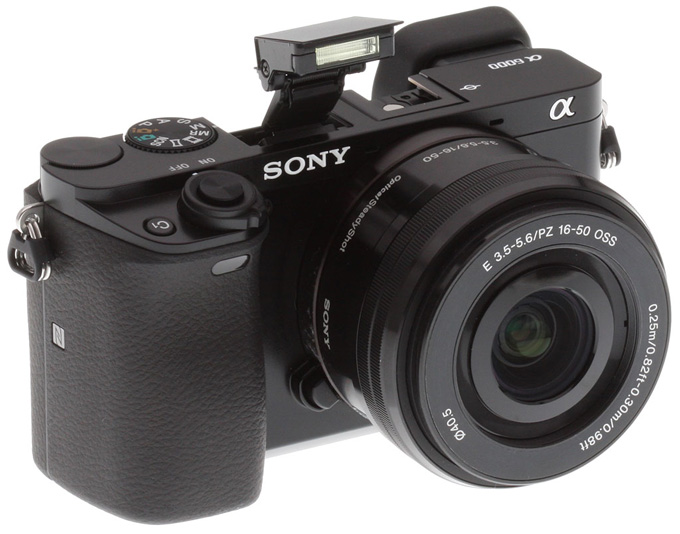
I’ve been shooting with my DSLR for years and I simply love it. Aside from maybe one day dropping my 5D Mark II in favor of a Mark III, I didn’t think any argument would have me questioning my choice in gear any time soon. That being said, I’ve seen a lot of top-notch shooters singing the praises of cameras like the Sony a6000 lately, and it has my interest piqued to say the least.

Mirrorless-Cameras
The Sony a6000


What is a “Mirrorless” Camera?


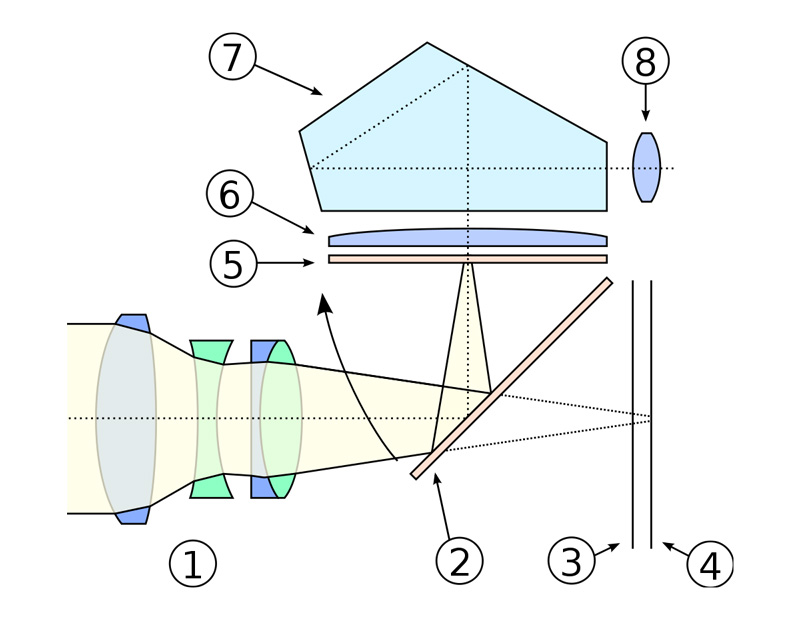
DSLRs take light in through the lens, bounce it around in a box, then direct it to the viewfinder so you can see what your camera sees.

mirrorlessCameras-3
Image credit: Wikimedia Commons


In contrast, a mirrorless camera simply displays what the sensor is recording, doing away with the need for a mirror assembly (DSLRs also have this option, but still need the mirror for the viewfinder).


What’s The Benefit of Going Mirrorless?


So there’s no mirror, big deal right? What’s the tangible benefit here? There are a few actually.


Size and Weight


If you’ve ever had a shoot last 8-10 hours, you’ll know that lugging around a DSLR that seemed light at the beginning of the day gets old pretty fast. Mirrorless cameras tend to be smaller and lighter than their DSLR counterparts, saving room in your camera bag and postponing that inevitable neck surgery by a few years.


Price


Mirrorless cameras are also typically cheaper than a DSLR by a few hundred bucks or more, and as we’ll see later, you can often achieve comparable specs. That being said, like DSLRs, there are mirrorless cameras for every budget and you can certainly find high end models north of ,500.


Live View Only?


Since you’re ditching the mirror, there’s no viewfinder, which means you can only do live view shooting. Some sites list this as a pro for various reasons, but I’m not exactly convinced that taking away a feature constitutes a benefit. DSLRs have live view shooting and viewfinders, so I’m giving this one to the DSLRs. Feel free to disagree!


It Can’t Possibly Match My Specs, Can It?


Here’s the real question. If you’re used to DSLR quality photography, will you have to sacrifice your expectations to move to a mirrorless camera?


Megapixels


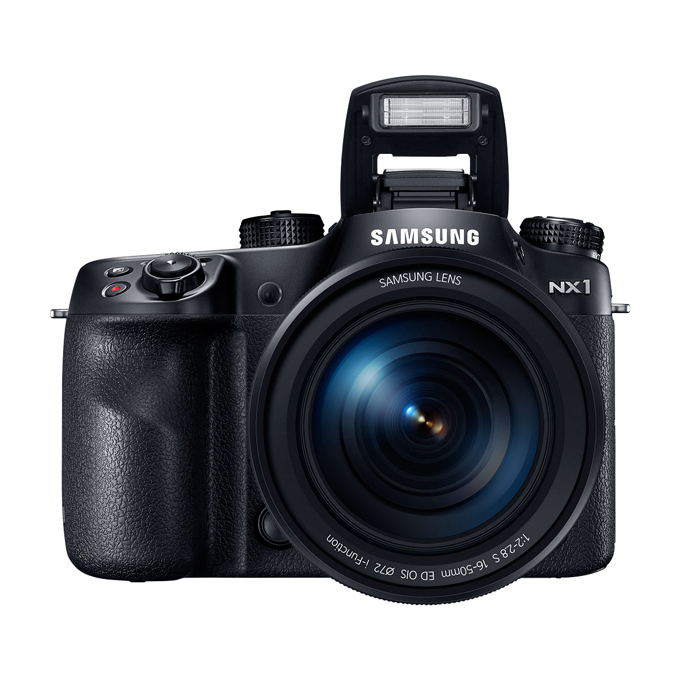
My beloved Canon 5D Mark II has 21.1 megapixels, the upgraded Mark III has 22.1. Beat that mirrorless! Not so fast, the Samsung NX1 is cheaper (around ,500) than either of those cameras and has a whopping 28.2 MP. Heck, even the Sony a6000, mentioned above, has 24.3 MP and can be found for about 0.

Mirrorless-Cameras
The Samsung NX1


ISO


Frankly, I don’t give a rip about megapixels. For me, it’s all about the low light performance, which means we’re talking ISO. The standard ISO range on my 5D Mk II is 100-6400, expanded up to 50-25,600. Cheaper mirrorless cameras typically have around a 100-25,600 range while the more expensive models like the Sony Alpha a7 match my DSLR at 50-25,600 (some of these cameras can even extend that to 51,200!).


Note that ISO range ≠ ISO performance. Some cameras perform better at ISO 3200 than others at ISO 800. For that, Photographylife has a nice color noise comparison of shots taken with various mirrorless models.


Video


I’ve got it! My 5D Mark II doubles as a video camera! It shoots full HD video. There’s no way your dinky little mirrorless models can do that, right? Wrong. Most good mirrorless cameras can tackle HD video. In fact, some of them, like the Samsung NX1, even shoot 4K video, with tracking autofocus to boot.


Going Mirrorless: The Cons


By now it probably looks like I’m only going to sing the praises of mirrorless cameras, but as I mentioned, I’m a deeply skeptical person when it comes to giving up my Canon, so I was eager to dig into the downsides of going mirrorless. Here are a few.


Battery Life


Smaller cameras equate to smaller batteries. Some of the more affordable mirrorless cameras boast a 320 shot battery. Hold the phone. 320 shots!? I take more than 320 photos at a wedding before I ever even see the bride and groom.


I can shoot all day on my 5D Mark II. 90% of the time, I make it through an 8 hour wedding on a single battery, and we’re talking 2,000+ photos. The mirrorless Panasonic GH4 is supposed to get 500 shots per battery, which is admittedly better than 320, but still far from ideal in my book.


Lenses


One thing that makes “professional” mirrorless lines better than your mom’s point-and-shoot is the fact that they have interchangeable lenses. For major brands like Sony, you’ll definitely be able to find some beautiful, high quality lenses. That being said, these cameras simply aren’t as established as major DLSR lines like Canon and Nikon, so you’re not going to find the depth or breadth of lens options that you’re used to. And no, your current lenses aren’t going to work, so you’ll be starting from scratch.


You Might Not Look as Cool


This one is totally superficial, but many photographers secretly think of it right away. When I walk into a wedding with my 5D Mark II with a Canon 70-200 on the front, I get lots of oohs and ahhhs. It’s a huge setup and it makes me look like I know what I’m doing, even if it does kill my back to the point that I’m limping by the end of the day.


Now, if you walk in with a mirrorless camera, odds are, the guests at the wedding will have cameras that are bigger than yours. This might cause you to feel inferior, or worse, cause your clients to make you think you’re really just an amateur.


As far as I’m concerned, if I think a camera is the best tool for the job, I’ll use it and let my photos do the talking.


Which Mirrorless Cameras are the Best?


Tomsguide has a great comparison of some of the best and most affordable mirrorless cameras on the market. Here are some of the models that they favor in that review:


  • Samsung NX300 (Best Mirrorless Camera for Beginners)

  • Sony Alpha a6000 (Best Intermediate Mirrorless Camera)

  • Samsung NX30 (Best Mirrorless Camera for Enthusiasts)

  • Olympus OM-D EM-1 (Best Rugged Mirrorless Camera)

  • Sony Alpha a7 (Best Pro Mirrorless Camera)

  • Panasonic GH4 (Best 4K Mirrorless Camera)

  • Samsung NX1 (Best Pro/4K Mirrorless Camera Candidate)

  • Sony Alpha a5100 (Best Midrange Mirrorless Camera Candidate)

Who’s Talking About Mirrorless Cameras?


Mirrorless cameras sound all well and good, but can a pro really consider replacing his/her DSLR kit with a mirrorless setup? Here are some videos of pros talking about how much they love mirrorless cameras.


10 Reasons Why a Professional Photographer Left Nikon and Started Shooting with Sony


In this video, photography Jason Lanier discusses why he switched to mirrorless cameras. I highly recommend giving this a watch as it was the catalyst for my endeavor to delve into the world of mirrorless cameras.


The Mirrorless Revolution


In this video, Michael Reichmann & Kevin Raber discuss how they believe the DSLR market will begin shrinking as the mirrorless camera segment grows.


(This video was not embeddable, go here to watch.)


Studio Portraits with Mirrorless Cameras and Off-Camera Flash


Worried about what mirrorless means for your off-camera flash shots? Me too. Here Joe Brady with Picket Wizard gets some awesome results with a mirrorless/off camera flash setup.


What Do You Think?


Whether you shoot with a DSLR or a mirrorless camera, I’d love to hear your thoughts. Do you think mirrorless cameras are the future? Would you consider buying one any time soon? In ten years, will the DSLR still hold its position as the number one choice for professional photographers? Leave a comment below and let me know what you think.


Header image created using Nature photographer..

Josh Johnson is the Inbound Marketing Manager for Creative Market. He’s equal parts writer, editor, designer, and photographer.


Should You Drop Your DSLR and Go Mirrorless?